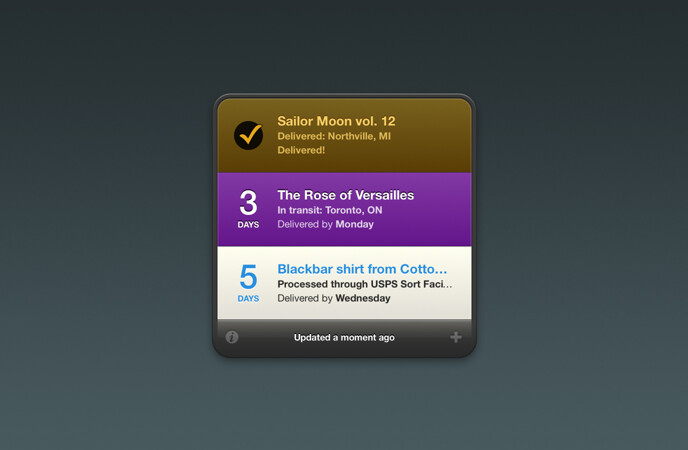
Delivery Status 6.3 Dashboard Widget
Requires a Mac with OS X 10.7 through 10.14.6. OS X 10.9.5 or later is recommended. For newer versions of macOS, download our Mac app.
Donations
Much of our software is free of charge. However if you find it useful we do ask that you consider a donation. Your donation makes it possible for us to keep making great software. Click here to donate now!
Need help?
If you have any questions, please see Delivery Status Widget for Mac Help.
Can’t wait for your packages to arrive? Don’t waste your time checking the site constantly, just open this all-in-one delivery tracker and enter your order number or tracking number.
The status will update automatically for you, and count down the days. It also works with Notification Center or Growl to let you know when your package status changes. Our syncing service keeps your Mac in sync with your iPhone or iPad.
Important note
macOS Catalina no longer supports Dashboard. We recommend switching to our full Deliveries for Mac app, which includes a Notification Center widget, a menu bar icon, and keyboard shortcuts for quick access.
Languages
Delivery Status is available in English, German (translated by Jennifer Brehm), Japanese (Justin McPeak and Nobtaka Nukui), French (Thierry Di Lenarda), Italian (Ivano Brignoli), Dutch (Tim Van Damme), Norwegian (Jonas Ensby), Danish (Tony Lorentzen and Christian Rasmussen), and Swedish (Christofer Karlsson).
Update history
New in version 6.3
- Improved results for La Poste, Apple, and Amazon.
- Improved HLG tracking number detection.
- Updated for compatibility with future service updates.
- Note: Mac OS X 10.7 or later is now required. Mac OS X 10.9.5 or later is strongly recommended, and required for some services.
New in version 6.2.9
- Fixed an issue where certain Amazon orders could get stuck, preventing other deliveries from updating.
- Fixed an issue decoding the characters æ and Æ in Amazon item names.
New in version 6.2.8
- Tooltips are now disabled by default. See here for more information.
- Updated for changes to La Poste, Posten Norway, OnTrac, and TNT.
- Improved results for Apple and DHL.
- Added support for future service updates.
- Some other minor improvements.
New in version 6.2.7
- Improved date detection for Amazon.de and Amazon.es.
- Improved tracking number detection for Hermes.
New in version 6.2.6
- Improved parsing of Italian dates.
- Improved tracking number detection for Post.at and TNT Express Australia.
- Improved compatibility with future service updates.
New in version 6.2.5
- Improved support for Amazon. This isn’t perfect, due to the limitations of Dashboard, but it will improve sign in reliability in some cases.
- Minor Junecloud Sync optimizations.
- Some behind the scenes changes to improve future compatibility.
- Forcing the widget to download a new service update (by clicking the version number) will no longer delete the installed update until the new one is downloaded and verified. So if anything goes wrong, you won’t be stuck with an older update.
- You can now download or delete your Junecloud Sync data.
- Improved compatibility with macOS Mojave beta.
- Important: This version works with Mac OS X 10.6 or later, but 10.9 or later is strongly recommended, and required for some services. FedEx, UPS, and the U.S. Postal Service recently updated their browser requirements. As a result of that, Dashboard itself can no longer connect to their sites in older versions of Mac OS X. The only workaround is to update to Mac OS X 10.9 or later. Older versions of Mac OS X will show a message that the shipment can only be viewed online.
New in version 6.2.4
- Updated for changes to Poste.it.
- Improved tracking number detection for several services.
- Some other minor bug fixes and improvements.
- Note: due to changes in macOS, the downloaded widget will no longer show a custom icon on your desktop. That’s normal—you’ll see the correct icon after you install it.
New in version 6.2.3
- Updated the Amazon sign in process. Instead of entering your password in the settings, you’ll now see a “sign in required” message when Amazon needs you to sign in again. When you add deliveries by order number, we recommend only adding deliveries from one Amazon account at a time.
- Added an option to look up Amazon shipments using a tracking link, without having to sign in. Just paste the address of a “Track Package” page or email link, or use the “Add to Deliveries” extension, and Deliveries will show a new “Amazon – by tracking link” option. Tracking a shipment this way won’t show information about other shipments in the order, and some orders can’t be tracked this way.
- Improved tracking number detection.
- Improvements for Amazon.es, Amazon.fr, and Amazon.it.
- La Poste France no longer specifies that it is only for letters.
- Some minor translation updates.
New in version 6.2.2
- Improvements for Amazon.de and Amazon.fr.
- DHL UK is no longer a separate option. These deliveries will be updated to use DHL Express.
- Adobe tracking no longer requires a user name and password.
- Removed support for City Link.
- “Other” shipments no longer check the web site for changes. This feature was confusing and rarely worked well. “Other” is now completely manual—it’s a way for you to keep track of shipments that can’t be tracked automatically.
- Most error logging is now off by default. If you’re having a problem, you can turn it back on with this Terminal command:
defaults write widget-com.junecloud.widget.deliverystatus loglevel -int 1; killall Dock; - Links to junecloud.com now use HTTPS.
- Some other minor bug fixes and improvements.
New in version 6.2.1
- Fixed a problem where an incorrect “64-bit required” message might show.
- Added back 32-bit support, so now any Mac with OS X 10.6 or later is compatible.
- Improved tracking number detection for UPS and U.S. Postal Service.
- Double-clicking on a delivery will no longer open a map, since this happened accidentally far more often than it ever happened on purpose.
New in version 6.2
- “Other” deliveries with a web site but no name or tracking number will show the domain name as a title.
- Fixed an issue where deliveries synced in from Apple, DHL, or PostNL might behave strangely.
- Improvements to the way passwords are looked up.
- Services updates can now be downloaded from our CDN instead of the sync service. This should improve the time it takes to download them and reduce load on the sync server as well.
- Posten Sweden is now PostNord.
- Updated for changes to Poste Italiane.
- Many minor bug fixes and performance improvements.
- OS X 10.6 or later
and a 64-bit processoris now required.
New in version 6.1.2
- Now compatible with OS X Yosemite (10.10). (If you’re looking for a Today widget for Notification Center, that’s included in our Mac app.)
- Improved parsing of dates on Amazon.es.
New in version 6.1.1
- Deliveries that don’t have a date will update more often. Deliveries that have had an error for several days will update less often.
- More frequent background updates for certain deliveries, especially those that don’t have a delivery date.
- Fixed a bug where “Ship date unknown” would sometimes display instead of the current status.
New in version 6.1
- Improved background notifications—updates are more frequent when they’re needed, less frequent when they’re not. We’ve also gotten rid of some unnecessary notifications.
- “Delivered” notifications now start with a checkmark to make them immediately obvious.
- Added support for Amazon.in.
- Fixed a problem where “last updated” sorting didn’t work right with some deliveries.
- Apple orders can no longer be looked up by zip code, so the interface has been updated to reflect this.
- Manually refreshing now only excludes deliveries that were updated in the last 5 minutes (rather than 10).
- Updated translations with the help of our wonderful translators.
- Subtle visual refinements.
New in version 6.0
- A new look: Updated design to match Delivery Status 5 for iOS.
- More sorting options: You can now sort by last updated in addition to delivery date or manually.
- Now supports OS X Mavericks (10.9).
- Added support for Chronopost.
- Improved efficiency. For example, manually refreshing will skip deliveries that were just updated, and deliveries that haven’t changed in a while will update less often.
- If you edit an “other” delivery and add a tracking number, Delivery Status will now try to guess which service it is.
- Temporary “not found” errors are now ignored, since this usually just means the tracking service is unavailable.
- When a countdown is over 99 days, it will now display in months.
- Deals better with time zone changes.
- Improved handling of connection timeouts.
- If you check the “donated” box, the “please donate” messages now disappear immediately.
- Experimental support for Status Board from Panic. Setting this up requires some technical knowledge—see here for instructions.
- Many other improvements and optimizations.
New in version 5.9.2
- Fixed some quirks when the web site is removed from an Other delivery.
- Improved update intervals. This should be more efficient without being noticeable.
New in version 5.9.1
- Improved sign in for Amazon and Google accounts that require verification.
- “Sort by date” improvements.
- The “you do not have any deliveries” message is now less obtrusive.
- Fixed an error with Growl notifications when a new version is available.
New in version 5.9
- DPD UK and TNT Express Australia are now supported.
- Improvements for FedEx, Canada Post, and other services in Mountain Lion.
- Improved tracking number detection.
- Fixed a bug where the wrong field might have been selected briefly when flipping the widget over.
- The icon is no longer blank in OS X 10.5.8.
New in version 5.8
- Support for Notification Center in OS X Mountain Lion.
- Beautiful new graphics for the MacBook Pro with Retina Display.
- Fixes a problem in Mountain Lion where FedEx would not refresh correctly.
- Improved method for verifying service updates.
- Lots of little adjustments and polish.
- Please note: OS X 10.5.8 or later and an Intel processor are now required.
New in version 5.7.1
- Fixed a problem where PostNL deliveries may not load.
- Improvements for Hermes, PostNL, and UPS Freight.
- Fixed a problem where push notifications might get disabled unexpectedly.
- Fixed a problem with text selection in Lion.
- Fixed a possible display glitch when flipping the widget over.
New in version 5.7
- Added support for Yodel and LaserShip.
- Updated for changes to Royal Mail.
- Improved sorting for deliveries with a ship date but no delivery date.
- The double-click speed should now match your system settings.
- Settings are now saved correctly with the Mountain Lion beta or Safari 5.2 beta.
- Signed with our Developer ID for Mountain Lion’s Gatekeeper feature.
- Fixed a bug where certain characters (™ and ®) might not display correctly in item names.
- Fixed a problem with “Other” deliveries where you wouldn’t be able to set certain dates at the end of a longer month.
- Other minor improvements and bug fixes.
New in version 5.6.1
- Fixed a syncing bug that caused poor performance when multiple copies of the widget were open.
New in version 5.6
New features
- Deliveries are now automatically sorted by delivery date when they’re updated. If you like you can turn this off in the settings, or by manually rearranging your deliveries.
- Australia Post and Amazon.es are now supported.
- TNT Post is now PostNL, and USPS has been updated for their new site.
Improvements
- Improvements for Apple, Amazon, Adobe, and DHL Germany.
- Improvements to syncing speed and reliability.
- If there’s a syncing error, the sync settings will now display automatically so you can fix the problem.
- Now supports Growl 1.3.
- The zip code is no longer filled in automatically if it’s not required.
- Deliveries that were found but don’t have any information yet will no longer show an alert icon. (For example, pre-orders for items on Amazon that don’t have a release date yet.)
- If cookies are disabled, and you’re using a service that requires them, you’ll now get a message explaining the problem.
- Removed ASIHTTPRequest and replaced it with simpler, custom code. This decreases memory usage and improves stability.
- Improved validation of service definition updates.
- The OS version is now included when syncing, to help us improve the service.
- Many other little things we hope you’ll appreciate if you notice them.
Bug fixes
- Service definition updates will work more reliably—you no longer need to press ⌘R after an update.
- Fixed a bug where “Other” deliveries with an invalid date (like September 31st) would not sync correctly. An adjusted date (like October 1st) would appear in the widget, but the date would be missing on iOS. The adjusted date now syncs as expected.
- Fixed some localization problems with dates in French.
- Fixed a bug where a delivery that was deleted and then re-added via sync might appear blank.
- Deliveries from unsupported services will no longer sync. (For example if you add a delivery for a new service, then sync to an older version that doesn’t include that service.)
New in version 5.5
New features
- Added support for DHL UK (Domestic Express) and Post.at (Austria).
- There’s a new Junecloud sync site at junecloud.com/sync
- The status of each delivery is now cached, like it is in Delivery Status touch. In short this makes Delivery Status faster and more reliable, as well as more useful when you don’t have an internet connection.
- Your sync password is now entered automatically if it’s saved in your keychain.
- Editing the password for a delivery will now immediately update any other deliveries that use that password.
- New Lion-style scrollbar.
Improvements
- Greatly improved notifications. Various unimportant changes to the status are now ignored, like minor changes in the text (using jsdifflib), or temporarily missing delivery dates. This affects Growl notifications as well as Push Notifications sent to your iPhone, iPad, or iPod touch.
- Improved syncing, especially when the time is off or when logging in.
- Improved date detection for non-English languages, especially on Amazon.it.
- Improved error checking for service definition updates.
- Improved update intervals for some deliveries, especially ones with errors.
- Improved compatibility with Mac OS X 10.5 (Leopard) especially when Safari 5 is not installed.
- Improved compatibility with Mac OS X 10.7 (Lion).
- Now 64-bit, and uses ASIHTTPRequest instead of CURLHandle for improved reliability.
- Subtly tweaked the icon to better pair with our new app, Notefile.
- More little things you may notice if you look very closely.
Bug fixes
- You’ll now get a friendly message if you try to run Delivery Status on an unsupported system, instead of crashing.
- Fixed a quirk when dragging deliveries in Mac OS X 10.5.
- Some other minor fixes.
New in version 5.4
- Tracking number detection: automatically selects the correct company for many tracking numbers. Guesses will improve as you use the app, or mark your favorites.
- Added support: for La Poste (including Chronopost) and Amazon.it.
- Improved results for UPS InfoNotice and DHL Germany numbers with multiple packages, City Link and DHL Germany numbers that require a postal code, Apple, Purolator, DPD, and FedEx.
- Optional fields are now marked as such—for example the zip code for City Link or DHL Germany.
- Improved VoiceOver support.
- The item name field is now automatically selected when you click the add button.
- Updated to the latest version of Growl.
- Fixed a bug where pasting in a field that already had text would not work.
- Fixed a bug where tabbing to a popup menu and typing would not update the display correctly.
- Fixed a bug where editing a delivery and canceling could cause unexpected behavior with that delivery.
- Fixed some problems when changing time zones or adjusting the time.
New in version 5.3
- Favorites: you can now star the services you use most to move them to the top of the list. (Requires Mac OS X 10.5 or later.)
- Smart updating: completed deliveries update less often, and shipments arriving soon update more often.
- Smarter notifications: If you’re actively using Dashboard, you won’t get needless Push Notifications or Growl notifications anymore.
- Fixes problems with Amazon, Poste Italiane, and TNT Post Netherlands.
- DHL US has been changed to DHL Express, and supports tracking deliveries from around the world.
- Added support for Apple Hong Kong.
- Improved mapping for some locations.
- Syncs more often when Dashboard is active.
- Improved error handling for services like Amazon and Apple where information is gathered from multiple sources. If the page with detailed tracking information doesn’t load, it’s now treated as a “couldn’t connect” error. This should cut down greatly on errant notifications.
- Adding an “Other” item from the history will now include the date.
- Fixes a bug where very long push notifications would not go through.
- Fixes a problem with Safari 5 installed where pressing Return or Enter while editing a delivery would do nothing.
- The history will now keep a minimum of 25 items.
- There is now a hidden setting to disable the tooltips that show delivery details. Enter this in Terminal on one line, then press return:
defaults write widget-com.junecloud.widget.deliverystatus disabletooltips 1; killall Dock;
To turn the tooltips back on, enter:defaults delete widget-com.junecloud.widget.deliverystatus disabletooltips; killall Dock;
New in version 5.2.1
- Simplified entry for DHL Germany shipments.
- Fixes a bug where deliveries older than 30 days could lose their settings and appear as a blank Amazon delivery.
- Syncs more often.
- Fixed a bug where passwords with special characters (like accents) would not work correctly.
- Fixed a problem with Aramex for those that have an account there.
New in version 5.2
- Added support for OnTrac.
New in version 5.1
- You can now use Delivery Status for Mac to send Push Notifications to Delivery Status touch for iPhone or iPod touch (requires version 3.1 or later).
- Service definitions are now updated automatically over the air, so problems can be fixed much faster.
- Added support for Post Danmark.
- Improvements to DHL GlobalMail, FedEx, TNT Post Netherlands, Aramex, Hongkong Post, and Posten Norway.
- Fixed a bug where the password may not be filled in automatically.
- Fixed some date-related problems that could happen at the end of the month.
- Date display now uses “today” and other relative dates.
- Improved reliability of syncing.
- Added a “Forgot your password?” button.
New in version 5.0.2
- You can now double-click a delivery to view its location in Google Maps.
- Improvements for Yamato Transport, Apple Japan, Posten Norway, Google Checkout, Swiss Post, UPS, US Postal Service, and Hermes.
- Fixed a problem with Royal Mail, JapanPost, Swiss Post, and GLS in Mac OS X 10.4 (Tiger).
- Syncing now times out after 15 seconds if junecloud.com is unavailable. We’ve also moved Junecloud to a new host to improve reliability.
- Improved tool tips (when you hover your mouse over an item) now include the delivery company.
- Fixed a bug where strange things could happen if you clicked a drag handle but didn’t move the delivery.
- Fixed a bug where some settings would not immediately stick.
- Fixed an incorrect password error when registering for an account.
- Improvements when syncing for the first time.
- Syncing a delivery with multiple packages will no longer change the displayed package.
- Improvements to automatic resizing.
- Improved handling of certain special characters.
- Spaces around tracking numbers are now removed automatically, in case of a sloppy copy and paste.
New in version 5.0.1
- Fixed a bug where some deliveries would not finish loading.
New in version 5.0
- Delivery Status has been completely redesigned with a new all-in-one format that integrates more closely with our iPhone and iPod touch app.
- Synced deliveries are now opened automatically, and deletions are synced as well.
- You can now add deliveries from unsupported companies by selecting “Other”. Enter any information that you have, including a name, tracking number, web site, and date. Delivery Status will show a countdown, and track the web site for changes.
- The history now includes item names from Amazon, Apple, and Google, so the delivery you’re looking for should be much easier to find.
- You can now create a new sync account directly from the widget.
- Improved results for Hermes, TNT Post Netherlands, GLS, Poste Italiane, Posten Norway, Amazon, Apple, DHL Germany, and RoyalMail.
- Nintendo has been removed as their order status is no longer available.
- Countdowns will now update immediately when opening Dashboard, even if the status hasn’t refreshed yet.
- Date and time displays will now respect your settings.
- Please note: Mac OS X 10.5 or later is now required for syncing.
New in version 4.8.3
- Updated for changes to the UPS web site.
- Improved results for Canada Post.
- Updated to Growl 1.1.5 framework.
New in version 4.8.2
- Improved results for USPS, Royal Mail, Canada Post, and TNT.
- Fixed a problem where Parcelforce deliveries would not load.
New in version 4.8.1
- Improved results for Canada Post, Hongkong Post, and Google Checkout.
New in version 4.8
- Added support for Swiss Post and Hongkong Post.
- Improved results for Parcelforce, Purolator, Hermes, FedEx, and Amazon.
- The FedEx SmartPost option has been removed. You can now track these deliveries with the standard FedEx option, which includes more details!
- Improved update checking. It will now check less often if there are no errors, and more often if there are errors.
- Fixed a bug where the status would unintentionally update when flipping to the settings screen, in some cases causing the widget to get stuck.
- New loading method for Amazon, Google, and Adobe. This should work more reliably in both Tiger and Leopard!
New in version 4.7
- Added support for DHL GlobalMail, TNT Post Netherlands, and Sagawa Express.
- Improved results for DPD, City Link, Posten Sweden, Posten Norway, and TNT.
- Changes made to a delivery on your iPhone, iPod touch, or the web will now sync back automatically.
- You can now turn off syncing by removing your email address and password.
New in version 4.6
- Added support for City Link (UK) and Yamato Transport (Japan).
- Improved results for FedEx, DPD, UPS, Hermes (HLG), Royal Mail, and Amazon.de.
- Improved reliability for syncing and updates.
- Amazon and Google Checkout now display more specific error messages.
- The “Sign Up” button will now take you directly to the “Create an account” page.
- All services will now work behind a proxy (Mac OS X 10.5 or later required).
- Improved graphics.
- Added Swedish translation (thanks to Christofer).
New in version 4.5.1
- Fixed a problem where DPD deliveries would incorrectly ask for a password.
- Apple order status has been improved for international orders.
- Since some DHL Germany shipments still require a zip code, this field has been re-added. Most shipments still do not require a zip code, so you can usually leave this field blank!
- Improved GLS tracking.
- Improved Amazon tracking for orders from Amazon.fr.
New in version 4.5
- You can now automatically sync deliveries with Delivery Status touch for iPhone or iPod touch, or sync your history with the widget on another computer. Deliveries will appear automatically in Delivery Status touch (no need to tap links in emails anymore) when you add them to the widget. Visit junecloud.com/sync to create an account. Click the info button to flip the widget over, then click the sync icon in the bottom-left corner.
- Updated to support the new DHL Germany tracking page.
- Added support for Hermes Logistik Gruppe (Germany).
- Improved GLS tracking, and added support for GLS in Austria, Belgium, Denmark, France, Ireland, Luxembourg, Portugal, and Spain (in addition to Germany).
- Fixed a problem with the encoding of special characters in certain Amazon orders.
- Delivery Status has a brand new icon! Thanks for all your feedback—we hope you love this one as much as we do.
- Improved Japanese and German translations.
- Improved the appearance of the loading spinner.
New in version 4.4.1
- Apple orders will now show the item name and full tracking details again. Some Apple Germany orders will now show additional details.
- Improved Amazon tracking for pre-orders with multiple shipments, and certain Amazon.fr orders
New in version 4.4
- Added an option to send deliveries to Delivery Status touch (for iPhone and iPod touch). To use this feature, click the info (“i”) button to flip the widget over, then click the new arrow button in the bottom-left.
- Greatly improved Amazon.fr tracking, and fixed encoding problems with certain characters
- Fixed and improved TNT tracking
- Updated Posten (Norway) for their new site and identity
- Packages in transit now have a unique icon if the delivery date is unknown
- There’s now a colon (:) between the item status and location to help clarify
- Fixed a bug where the checkmark icon could appear on top of a 0 days count
- The + button should work more reliably
- New delivery truck icon and Junecloud branding!
New in version 4.3.2
- Fixed Canada Post tracking
- The exclamation mark icon will no longer appear when the widget is blank
New in version 4.3.1
- Fixed UPS tracking
- Please see here if you are having problems with FedEx SmartPost
New in version 4.3
- Added Poste Italiane (Paccocelere1, Paccocelere3, Postacelere1, PaccocelereMaxi, and PaccocelereInternazionale), thanks to Claudio Procida of Emeraldion Lodge
- The item name is now displayed even if your settings are incomplete (rather than showing a blank widget) which is useful if you want to make note of an item you don’t have a tracking number for yet
- Fixed Posten (Sweden) tracking
- Fixed a bug with UPS Mail Innovations tracking
- Fixed a bug where Growl would sometimes display unnecessary messages
- Fixed a bug where the links to Growl, help, donate, and visit my site would not work correctly when Apple or Parcelforce was selected
- Updated to Growl framework version 1.1.4
New in version 4.2.1
- Fixed a regression where Japanese characters in Amazon.co.jp orders would not display correctly
New in version 4.2
- Added support for Parcelforce
- Significant improvements to Google Checkout tracking
- Improved Posten (Norway) tracking
- Improved Amazon tracking, including a bug affecting German orders in March
- Improved UPS Mail Innovations tracking
- Fixed a problem where clicking the logo for an Apple order would often display a “session timed out” error or blank page, rather than the delivery details.
- The alert icon no long appears in minimized mode for a blank widget
- Fixed a bug where some tooltips with quotes would not display completely
- Added Finnish translation by Tapio Karppinen
- Added Danish translation by Tony Lorentzen
- Added a hidden setting to change the number of days history items are saved. Enter a command like this in Terminal:
defaults write widget-com.mikepiontek.widget.deliverystatus historydays -integer 90(where 90 is the number of days you want history items to be saved)
New in version 4.1
- Added support for GLS Germany
- Added support for Japan Post (EMS, Yu-Pack, Registered Mail, and Morning 10 Overnight Mail)
- Fixed Aramex
- Improved tracking for Amazon.co.jp
- Improved Growl icons with larger logos and higher resolutions
- Improved preloading of graphics
- The widget will once again count down the days until shipment if there is no delivery date estimate
- Various bug fixes
New in version 4.0
- The delivery history has been completely redone. Now all of the settings for your past deliveries are remembered, not just the tracking number!
- You can now add a custom item name for any delivery type! Even better this item name is listed in the history to help you find past deliveries easier
- There is now a “Clear History” option at the bottom of the history menu
- Custom Growl icons are now displayed to indicate the delivery company
- Growl notifications are no longer displayed right after you’ve edited your settings or if you update manually, since you’re already looking at the results
- Upgraded to Growl framework 1.1.2
- If you use the magnified view, Delivery Status will now remember this the next time you open a new widget
- DHL Germany deliveries will now show the information in the process (“Vorgang”) field
- Improved tracking results for Amazon orders
- Fixed UPS
- Fixed FedEx SmartPost (Customer ID is no longer required for FedEx SmartPost shipments)
- Fixed Royal Mail
- Fixed Google Checkout (again, twice!)
- Fixed minor problems with USPS tracking
- Fixed problems with the installer on certain computers
- Fixed version checking in Leopard (unfortunately Leopard users with older versions will not be notified of any updates, so please help spread the word!)
- Added high resolution icons for Leopard
- A simple donation request is now displayed after a shipment has been delivered
New in version 3.9
- Added an installer that will intelligently decide whether to install normally or ask if you’d like to smart upgrade. A smart upgrade allows you to keep your open widgets with the click of a button!
- The + button will now work more reliably, specifically if the widget is installed in the root Library/Widgets folder rather than the one in your home folder.
- Amazon.co.jp orders will now display correctly in Leopard. Hopefully 10.4.11 will solve this problem in Tiger.
- Added support for DHL Germany international shipments (simply leave the zip code or PLZ field blank)
- Improved tracking for certain DHL shipments
- Fixed DHL US tracking
- Fixed UPS Mail Innovations tracking
- Fixed Google Checkout tracking
- Fixed a bug where text could disappear if an ampersand was entered in the item name
- Improved handling of special characters in Growl notifications
- Visual fixes for Leopard
New in version 3.8
- Added support for FedEx master tracking numbers with multiple packages
- Fixed a problem that caused “not found” errors for Amazon orders
- Improved Amazon tracking for certain orders
- Apple orders that use the international date format will now display correctly
- Added support for Apple orders shipped via Purolator or TNT
- Improved Purolator tracking
- Improved USPS tracking
- Added support for Sweden Posten
- Added support for Norway Posten
- Fixed a problem that caused “not found” errors for Google Checkout orders
- The version number is now displayed on the back. You can click the version number to check for a newer version immediately.
- Added Norwegian translation by Jonas Ensby
- Fixed a small error in the Dutch translation
- Temporary files are now deleted automatically
New in version 3.7
- Added support for Royal Mail
- Added support for Aramex
- Added support for DPD
- Improved UPS Mail Innovations tracking
- Improved Amazon tracking
- If an Adobe order is not found, you will now have the option to re-enter your password
- Fixed a small error in the Italian translation (thanks to Pietro)
New in version 3.6
- Added support for UPS Mail Innovations
- Fixed problems with TNT and Apple tracking
- The “New Version” notification is now less obtrusive, and can be dismissed. (Clicking the x will dismiss it for 7 days.)
New in version 3.5
- Added support for Purolator, Google Checkout, and FexEd SmartPost
- Added a popup list of the 10 most recent tracking numbers used for each service
- You can now open a new widget by pressing the button. The button to change the size is now a magnifying glass. (Thanks to earthsaver on Dashboard Widgets for the suggestion)
- Added a help (?) button on the back
- Improved tracking for certain USPS and Canada Post shipments
- Fixed a bug where the widget would display the wrong panel if a password was required after reloading
- Small fix in the Dutch translation (thanks to Yves Boulogne)
- Items that are shipping on the current day but do not have a delivery estimate will no longer display a “0 days” countdown
New in version 3.2.3
- Improved tracking for certain FedEx and DHL shipments
- Improved tracking for certain Apple store orders, and added support for Apple orders shipped via UPS
- Improved ability to track Amazon orders from different accounts at the same time
- Improved “not found” and “couldn’t connect” errors for UPS and Adobe
- Fixed a bug where packages may have displayed even if they were removed from the order
New in version 3.2.2
- Minor fix for some graphical glitches during loading (oops!)
New in version 3.2.1
- Minor fix for some graphical glitches during loading
New in version 3.2
- Added support for DHL Germany
- Improved DHL US tracking (certain estimates weren’t showing up)
- You can now hover the mouse over a long status message to see the entire message
- Improved Growl checking
- Growl messages are no longer displayed in all caps
- Fixed an error in the Japanese translation (it said hours instead of days… sorry for any confusion!)
- Added a new loading image (loading is much more elegant now, especially if you have a bunch of small widgets close together)
- The default size is now slightly wider (to match the back side and show more information)
- Adjusted FedEx logo
New in version 3.1
- Added support for Growl which means you can now get a popup window, email notification, spoken alert, or other notification when your delivery status changes!
- Added support for Canada Post
- Added support for the Adobe online store (US and Canada), great if you’re anxiously awaiting your CS3 order!
- Added Japanese translation (thanks to Justin McPeak)
- Clicking the DHL logo will now take you directly to your tracking page, as it does with the other carriers (thanks to Adam Mabe)
- Email addresses with plus ( ) signs will now work correctly
- If checking for an update to the widget fails, it will no longer check again repeatedly
- Fixed some localization issues
New in version 3.0
- The latest detailed tracking information is now displayed right in the widget! If your package is out for delivery, arrived in Kentucky, or held up in Alaska, you’ll know it all right away. Click on the text to see the date the status was last updated.
- Added support for Nintendo store orders in the US and Canada
- You can now double-click the resize handle to toggle between the default size and the smallest size
- Fixed a bug where deliveries with no item name would sometimes have an incorrect item name added
- Fixed a bug where deliveries that changed from a found shipment to not found may not display correctly
- Fixed some small issues with the Italian and Dutch translations
New in version 2.7.1
- Fixed a bug where date ranges given by the Apple store would not always display correctly
- Improved display of delivery dates for USPS tracking, after the package is delivered
New in version 2.7
- Added a French translation by Thierry Di Lenarda and an Italian translation by Ivano Brignoli
- The widget will once again count down the days until shipment if there is no delivery date estimate
- Fixed a bug where some Apple orders would not display all the items
- Fixed a bug where some Apple orders would not show delivery estimates
- Fixed a bug where Apple orders would sometimes display a “couldn’t connect” error when that was not the problem
- Fixed a bug where third-party Amazon orders would not always display
- Improved display of dates
- Fixed a bug where clicking the company logo would lead to the wrong web site if no information was entered on the back
- If the settings are intentially left blank, the widget will no longer flip over automatically after restarting
New in version 2.6
- Updated to work with changes made to the Apple store
- Added support for TNT tracking by either consignment number or reference number
- Searching for Apple store orders by zip code is now an option in the “Delivery From” menu. (Before you had to click the “Email Address” label, which wasn’t very clear!)
- If a delivery was not found, its name or order number will now display on the front of the widget. Useful if you have multiple shipments that have not been registered by the shipper yet. (Thanks to Todd Andrews for the suggestion!)
- Improved the update checking so you’ll always be notified of new versions even if your delivery is displaying correctly. The widget will check for updates no more than once a day.
New in version 2.5.1
- Fixed a bug where tracking dates for orders with multiple shipments would get mixed up if they were processed too quickly
- Shipped status and dates will now display correctly on USPS orders. (Delivery estimates will not display because USPS does not provide them online.)
- Improved date display and tracking for certain Apple Store orders, including tracking support via applestore.bridge-point.com
New in version 2.5
- FedEx tracking is seamlessly integrated with Apple orders. Now after your order ships, it will check FedEx and give you a much more exact delivery estimate
- Detailed tracking for all Amazon.com (US) orders is integrated in the same way
- Added new options for FedEx, UPS, USPS (United States Postal Service), and DHL (US only) in case you’d like to track a delivery from somewhere else
- Improved the way last-used settings are handled
- Many bug fixes and refinements
- One last name change! I apologize for any confusion the name changes may have caused. First known as Apple Order Status and then just Order Status, the final name is now Delivery Status.
New in version 2.0
- You can now select from Apple.com (including all international stores), Amazon.com, Amazon.ca, Amazon.co.uk, Amazon.co.jp, Amazon.de, Amazon.at, and Amazon.fr
- The appearance has been adjusted to look much better on a wider range of display settings
- The fields are larger to make it easier to enter your information
- The widget size setting has been removed from the back and replaced with a or - button on the front
- You can now change the width of the widget to any size you like, including a space saving icon view
- The widget will now remember the last item in the order you viewed
- Improved the reliability of delivery dates in some situations
- Orders with multiple items now have a number displayed before the item
- Apple store orders are now checked over a secure connection
- There’s now a button to donate, if you appreciate my work
New in version 1.5.3
- Updated to work with changes made to the Apple store. If you’re getting an “couldn’t connect” error, this update should fix it!
- If the widget is unable to find your order in the future, it will automatically check to see if a new version of the widget is available!
New in version 1.5.2
- Updated to work with changes made to the Apple store. If you’re getting an “order not found” error, this update should fix it!
New in version 1.5.1
- Fixed a problem where the widget often wouldn’t connect on the first try
- Added German localization courtesy of Jennifer Brehm
New in version 1.5
- Updated to work with changes made to the Apple store. If you’re getting a “couldn’t connect” error, this update should fix it!
- You can now look up orders by email address! Just click the “Ship to Zip” field label to change it to an “Email” field
- Fixed a small bug where certain orders could incorrectly display “no items found”
- Added support for localizations, though at the moment the widget is still only in English
New in version 1.4
- Much better support for orders with multiple shipments
- Error messages are more helpful when no items are found
- Now displays “delivered soon” for items that are estimated to deliver that day, but have not yet shipped
New in version 1.3.1
- Now displays “shipping soon” for items that are estimated to ship that day, but have not yet shipped (thanks to Sean Hill for assistance)
- Items that were “replaced with new product” are no longer displayed
New in version 1.3
- Changed “Zip Code” to “Ship To Zip”. You must enter the postal code of your shipping address, not your billing address.
- Added tool tips to all of the preferences. Hold your mouse over an option for more information.
- Added tool tips to the item names. Hold your mouse over an item name to see the full name.
New in version 1.2
- Improved reliability, particularly on Intel Macs
- Lowered memory usage (now uses XMLHttpRequest instead of curl)
New in version 1.1.1
- Fixed a bug that prevented certain orders from displaying (thanks to C.J. Sanders for assistance)
New in version 1.1
- Added support for multiple items. Clicking the item name now displays the next item in your order, instead of the Order Details page (thanks to Jim Craig and Dean Hsu for assistance)
- Clicking the Apple logo now opens the Order Details page in your browser, instead of the main store page
- A link to a tracking page is now displayed for shipped items, when possible
- Countdown is now updated at midnight instead of noon
- Countdown is now updated every time Dashboard is activated, even if it’s not time to update the order status online
- Added an option to update every week
- Added support for Canadian postal codes (thanks for Jim Dovey for assistance)
- Many enhancements and bug fixes to improve reliability
- Several minor graphical improvements
Supported services
- Amazon Including Amazon.com, Amazon.ca, Amazon.co.uk, Amazon.co.jp, Amazon.de, Amazon.at, Amazon.es, Amazon.fr, and Amazon.it, Amazon.in, as well as Amazon Payments. When you track an Amazon order you’ll get tracking details from many of the shipping companies they use, including Amazon Logistics, US Postal Service, UPS, OnTrac, LaserShip, Ensenda, Prestige, and more.
- Apple.com Including all international stores.
- Aramex Shop and Ship deliveries only.
- Canada Post (Postes Canada)
- Chronopost (France)
- DHL Including shipments in most countries, DHL eCommerce (formerly DHL GlobalMail) in the US, as well as most shipments in Germany. For some shipments, including DHL Germany and DHL eCommerce, the delivery date is not currently shown directly in the app, but is available in an online view.
- DPD Germany. Currently DPD UK information can only be shown in an online view.
- GLS Including Austria, Belgium, Denmark, France, Germany, Ireland, Luxembourg, Portugal, and Spain. We do not currently support GLS US.
- Hermes Logistik Gruppe (HLG) Germany only.
- Japan Post Including EMS, Yu-Pack, Registered Mail, and Morning 10 Overnight Mail. We do not currently support JP Express.
- La Poste (France)
- LaserShip
- OnTrac
- Parcelforce
- Post (Austria)
- Poste Italiane
- Posten (Norway) Including Bring.
- PostNL (formerly TNT Post Netherlands)
- PostNord (Sweden and Denmark)
- Sagawa Express
- TNT Includes most countries, as well as TNT Express Australia. We do not currently support TNT UK, TNT France, or TNT Italia.
- U.S. Postal Service (USPS, United States Postal Service or US Post Office)
- Yamato Transport (Kuroneko)
- Yodel
- Placeholder You can manually add other packages from other services by entering a web site, delivery date, and other info.
In some cases, services we previously supported are no longer available due to changes with the shipping service. These include UPS, FedEx, Australia Post, DPD UK, Hongkong Post, Purolator, Royal Mail, and Swiss Post. You can still add shipments from these services, but tracking information can only be shown in a web browser view.