Business Cards
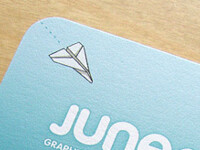
My new business cards finally showed up today, and they look awesome.
Same as with the site, Holly Tickner drew the illustrations, and I designed the rest. I wanted to use the robot illustration on the front of the cards, but I couldn’t work out a layout I was happy with. The paper airplane fit in perfectly, but my initial thought was that it seemed a little inappropriate to have on the front of my business cards… I guess because it’s been overused as a way to show a kid goofing off in class, someone that doesn’t take things seriously. Eventually I realized it was a perfect symbol: it’s just a plain piece of paper, but with a little ingenuity it can fly as far 112 feet. That’s exactly what Junecloud aims to do: start simple and make something amazing.
I had wanted to order them from Moo but I got a bit frustrated with their system—I don’t think it’s an ideal setup if you already have a precise, finished design. Their cards are also a non-standard size (at least in the US) and I already had finished art at 3.5 x 2 inches.
So I ended up getting them from PSPrint—we had some postcards printed there for Tense Forms and those came out great, so I was pretty sure I’d be happy with the quality. Like Moo, they have an online tool to upload your artwork, but in this case you’re expected to supply the art in a precise format, and you have fewer options for making adjustments in your browser. It made me feel more confident they would come out as I expected. I ordered 250 cards on 13 pt., 100% recycled matte, color on both sides. 250 was the minumum to have them printed on an offset press, which seemed preferable to a digital press to me. Total cost with shipping: $46.13. Not bad at all!
As for the rounded corners: PSPrint does offer die cutting, but their minimum order is 500. To get what I wanted it would have cost me $250… I’d have twice the cards, but it’ll likely be years before I even get through 250 of them. Fortunately I have a Marvy Corner Punch I picked up at a craft store a few years back. Doing one corner at a time is a little tedious, but since I go through cards slowly there’s no need to do them all at once. I knocked out a couple dozen in a few minutes. Well worth saving 200 bucks, and the end result looks great.
Welcome to Junecloud!

When I first started running my own business full time a few years back, I really wasn’t sure how long it would last. It’s been stressful, it’s been hard work, but it’s also been fun and rewarding. I’ve had the opportunity to work with a lot of great people. I’ve also spent more and more time on my software—it started out as a hobby, but now I’m making a fair amount of income just in donations. (Thank you!)
It’s clear now that I’m in this for the long haul, and I won’t be giving up my business any time soon. So I figured it was time to make it all a bit more official. After a good month or two I finally came up with a company name that both sounded good and had an available .com address: Junecloud. June was my grandmother’s name and the month my mother and I were born in. Cloud brings to mind some beautiful images and it’s also a symbol of that nebulous thing that’s at the heart of what I do: the internet. I think it’s perfect. On August 15th, 2008, the paperwork was filed, and Junecloud LLC was formed.
Right now I’m the sole employee of Junecloud, but my hope is that this is just the beginning. I’ve been hiring Holly Tickner for contract work more frequently—she created the charming illustrations above. Hopefully I’ll find more talented people to work with in the future. (If you’re interested, drop me a line).
Thanks everyone, for all of your support. Here’s to many more years of great design and software!
Cheers,
Mike Piontek
Delivery Status touch icon

While working on Delivery Status touch (for iPhone and iPod touch) it was clear I needed a new icon. The old “18 days” icon I’ve used for the Dashboard widget was just something I threw together quickly. I never spent much time on it because it isn’t seen terribly often, and I couldn’t justify spending a lot of extra time on a free widget that already sucks up a lot of work hours. Delivery Status touch is different though—that icon will live on people’s home screens and they’ll tap it every time they use the app. Plus it was a good excuse to finally do what I’ve wanted to do for a while now.
I knew from the start I wanted to use a delivery truck. I started out sketching the type of vehicle you generally see delivering packages to your door. It didn’t quite fit the space though, and I loved the idea of designing the icon as a physical object that just happens to fit perfectly into a rounded square area. So I went with something more like a semi. I had to abstract the design somewhat—if this was a real vehicle it’d look very odd—but I think I’ve managed a design that looks striking and unique without looking strange. It’s instantly recognizable as a truck.
I decided on the color early on. I wanted to use something brighter at first. Blue was tempting but there are a lot of blue icons on the iPhone already. Red works well for icons like Calendar and FileMagnet but in this case I felt there’d be too much of it. Yellow was out because it’d look too much like Panic’s Transmit icon. Other bright colors like purple or orange just didn’t seem right to me. Eventually I settled on a shade of brown that falls somewhere between the old Delivery Status widget icon and the darker brown of a UPS truck. I think it’s a perfect fit, and it mingles well with the other iPhone icons. The touch of blue through the window and the yellow headlights help it stand out. (I was careful to roughly match the blue sky in the Weather and Photos icons.)
I wanted a design that would work at larger sizes in addition to the small iPhone icon size, so I could use it for the Mac OS X Dashboard widget as well as in promotional materials. That was a tough, I spent a lot of time struggling with it. Early on I reduced the number of bars in the grille, as they blurred together on the iPhone when there were more of them. Initially I had a dark bumper and lighter grille, but the bumper got lost on the iPhone’s black background so the values were switched.
I also used a lot of hard lines for shadows and highlights initially. It looked good on the iPhone but blown up it seemed very flat—it looked like a bunch of graphic shapes instead of a cohesive object with depth and form. So as the design progressed, I added more gradients, blurred the shadows, and used highlights to pull the shapes together. The black lines were toned down as well. Gradients and highlights that seemed much too strong in the larger view were often difficult to even see on the iPhone, so I spent a lot of time tweaking, testing, and repeating.
Initially I didn’t plan on using the standard glossy curve you see on many of the iPhone’s icons. Something wasn’t quite right though in the final stages, it was still lacking depth. After hours spent tweaking it (I’m not even kidding), that glossy highlight turned out to be exactly what it needed.
I used Adobe Illustrator to create most of the icon—probably the most complex work I’ve ever done in Illustrator. The finishing touches, including the top and bottom bevels and the glossy highlight, were done in Photoshop. I also used Photoshop for the first color mockup you see in the progression. It seemed like the easiest way to rough in the colors and make sure it was working well, before I recreated it all in Illustrator.
« NEWER | 1 | 2 | 3 | 4 | 5 | 6 | 7 | 8 | 9 | 10 | 11 | OLDER »
Songs
This is what we’re listening to right now:

Phantom Limb
by The Shins
Blogs
This is what we’ve been reading recently:
- Let Me Google That For You Teaches You How To Google [Google]
- Park Bench-Sized Ghetto Blaster Plays Music Via Bluetooth [Boom Bench]
- Coraline Site Up
- ★ Google Mobile Uses Private iPhone APIs
- VIDEO: Here's a demo of some thoughtful UI on Ffffound.com.
- Ana Serrano
- Release day
- Finally, Lasers That Heal Wounds Rather Than Creating Them [Science]
View more
Design
Reviews I’ve decided to add a new section to my journal: reviews. As a designer I spend a lot of…
Tense Code 3.0: a new look and iPhone support This entry is part of a series showing off the new features in Tense Code 3.0. Tense Code…