Notefile 2.7.2 for Mac
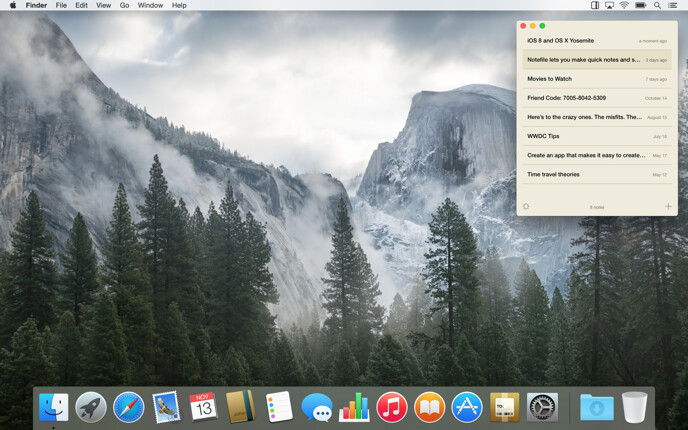
Notefile lets you make quick notes and view them easily, on all your devices. It’s available as a Mac app, a Dashboard widget, and a universal app for iPhone, iPad, and iPod touch. Your notes sync automatically with iCloud, or our own Junecloud sync.
- Shows in the Dock or your menu bar
- Compact window stays out of the way
- Set a keyboard shortcut to get to your notes quickly
- Navigate quickly with your keyboard
- Calculate math right in your notes
- Easily share notes via email, iMessage, and more
- Open plain text files from other apps, and export them too
Languages
Notefile is available in English, Japanese (by Nobtaka Nukui and Justin McPeak), French (Thierry Di Lenarda), and German (Jennifer Brehm).
Update history
New in version 2.7.2
- Improved iCloud compatibility with future versions of the app.
- Some other minor adjustments.
New in version 2.7.1
- Now compatible with macOS High Sierra.
- Improved the design of the preferences window.
- Some other minor adjustments.
New in version 2.7
- All new iCloud syncing is faster and more reliable than ever. Make sure you update Notefile on all your devices to continue syncing—Notefile 2.7 for iOS or Mac. Older versions won’t be able to sync with these newer versions. Alternatively, you can use Junecloud Sync to sync with older versions.
- Improved reliability of Junecloud sync.
- Fixed some possible crashes, and a few other minor improvements.
New in version 2.6
- You can now share notes with AirDrop.
- Opening multiple files at once will now add all of them, instead of just one.
- In menu bar mode, the window now moves the current screen or space when the app is activated.
- Syncing improvements for iCloud and Junecloud.
- Improved keyboard navigation.
- Improved reliability when exporting, and added an option to cancel when there’s an error exporting multiple items.
- Quitting the app is much faster now, especially when syncing with iCloud.
- The contextual menu on the Dock icon will now show your 10 most recent notes instead of all of them.
- Fixed a bug where some changes might not sync if they hadn’t already synced when the app quit.
- Some database optimizations.
- Lots of minor fixes and improvements.
New in version 2.5.1
- Fixed a bug where trying to sync Chinese or Japanese text to Junecloud might cause the app to crash.
- The “split view” mode now does a better job of focusing on the text area when it’s appropriate (like when a note is clicked on or the return key is pressed).
- Improvements for Junecloud Sync, particularly when logging in or out. Also fixed a significant inefficiency that would happen if more than one app was logged into Junecloud at the same time.
New in version 2.5
- A fresh look, with full support for Yosemite (including the dark menu bar).
- The window is no longer attached to the menu bar in menu bar mode, for greater flexibility, and the app no longer has to be restarted to switch modes.
- Easier access to share, export, and delete options while you’re viewing a note.
- Much smaller app size for faster loading.
- Added a restore option to restore a deleted note without having to edit it.
- You can now search your history even after deleting the last note.
- Improved iCloud support, especially with accounts that have iCloud Drive enabled.
- Added a couple of larger font size options.
- Improved full screen view.
- A very nice about screen.
- Note: OS X Yosemite (10.10) is now required.
New in version 2.1.1
- Fixed a bug where notes would not always export in the right format.
- Fixed a bug that made it impossible to register for a Junecloud account from within the app.
- Fixed a possible crash while syncing, and some other minor syncing improvements.
- Fixed a bug that could prevent exported files from being correctly associated with the app.
- Fixed a problem with code signing on certain versions of OS X.
New in version 2.1
- Significant performance improvements for iCloud sync.
- Improved support for right-to-left languages.
- Swipe gestures now respect your setting in System Preferences.
- Fixed a bug in menu bar mode where the window might appear too high or too low on the screen.
- Fixed a bug where scrolling might stop working.
- Fixed a bug where the “Hide Automatically” option in the gear menu did not always show the correct state.
- Fixed a possible crash when opening files, and a few other possible causes of crashes.
- Some other minor improvements.
New in version 2.0
- Updated design to match Notefile 2.0 for iOS.
- You can now type a space in the search field to show everything.
- iCloud Keychain is now used for your Junecloud sync account if you have it enabled.
- If a note syncs while you’re editing it, the insertion point no longer jumps to the bottom.
- Improvements for iCloud and Junecloud syncing.
- Improved support for responsive scrolling in Mavericks.
- Fixed a bug where the app would sometimes crash when syncing with iCloud.
- Fixed a bug where sharing, exporting, or printing a note might not include the latest changes.
- Fixed a bug in OS X Mavericks where the menu bar did not appear at launch.
- Fixed a bug in OS X Mavericks where Spotlight indexing did not work correctly.
- Fixed a bug in OS X Mavericks where Quick Look previews did not display correctly.
- Fixed a bug where the window would sometimes extend off the bottom of the screen when using multiple displays.
- Fixed a bug where the main window would sometimes jump in front of the preferences window when returning to the app.
- Fixed a bug where the window was not always positioned correctly in menu bar mode.
- Fixed a bug where no error message was displayed if there was a problem exporting notes in Notefile format.
- Fixed some quirks when clicking the “Switch to Junecloud” button.
- Note: OS X 10.8 or later is now required.
New in version 1.3.1
- Fixed a bug where the window was sometimes too large for the screen in menu bar mode.
- Fixed a bug where text might display in the wrong font when switching between notes in different languages.
New in version 1.3
- In menu bar mode, the window size now adjusts to fit its contents. Drag the bottom of the window to set the maximum size.
- You can now print your notes. Choose Print from the file menu, or right-click a note in the list.
- Times are more specific, using text like “a moment ago” or “3 hours ago”.
- Better window sizing for full screen and zoom.
- Improved swipe gestures.
- Improvements for VoiceOver.
- Pressing command-return while the window is large now switches the focus to the notes list, for better keyboard navigation.
- The “Close” option is now in the Window menu where it’s more appropriate.
- Fixed a bug where the app could freeze up in menu bar mode.
- Fixed a bug where some items were removed from the history too soon.
- Improved reliability when syncing with Junecloud for the first time.
New in version 1.2
- Notefile’s URL scheme now supports searches: notefile://search or notefile://search?text=example
- Greatly improved scrolling performance in the list view.
- Viewing a note in your history no longer restores it. Make a change to a note to restore it.
- Fixed a bug where simply searching for an archived note would restore it.
- Fixed a bug where the app became unusable if you searched for something, then edited a note in a way that caused it to no longer appear in the search.
- Fixed a bug where the scrollbar would sometimes flash white when it first appeared.
- Fixed a very specific sequence that would make everything disappear.
- Numerous tweaks and improvements for syncing.
New in version 1.1
- Clickable links: click a link to open it in your browser. Other data detectors like phone numbers and addresses are enabled as well.
- Text size: choose from various text sizes in the preferences.
- Export: save a copy of your notes in Plain Text or Notefile format.
- Start at login: there’s now an option to automatically open Notefile when you start up your Mac.
- iCloud improvements for OS X 10.8 or later.
- In menu bar mode, the gear menu now includes a “Hide Automatically” option so you can quickly toggle it.
- Improved the “calculate” option.
- Imported files now preserve their date, and the file name is added to the first line.
- Changes to spell checking and text substitution settings are now remembered.
- Tab spacing should match iOS a bit more closely.
- Prettier search bar.
- Fixed a bug where the app would sometimes consume 100% of the CPU.
- Fixed a bug where a note created via URL (notefile://add?text=Hello) would not get saved unless it was modified afterward.
- Fixed a bug where a note might fail to save if you had just deleted the last note.
- Fixed a bug where some strange things could happen if “hide automatically” was checked and the app was in full screen mode.
- Many other subtle improvements.
New in version 1.0.1
- More animation in Mountain Lion.
- Clicking the note count while the search field is showing will now close the search.
- If you’re viewing a note, expand the window, and then shrink it back down, the note will continue to show instead of the list view.
- Fixed a problem with Spotlight not working correctly.
- Fixed a possible syncing problem.
- If the app is set to launch hidden on login, the window will no longer appear.
- Other minor bug fixes and improvements.
1.0
Hide previous updates