Deliveries 9.6.3 for iOS
Requires iOS 14 or later. Compatible with iPhone, iPad, and Apple Watch. Also available for Mac.
Need help?
If you have any questions, please see Deliveries for iOS Help.
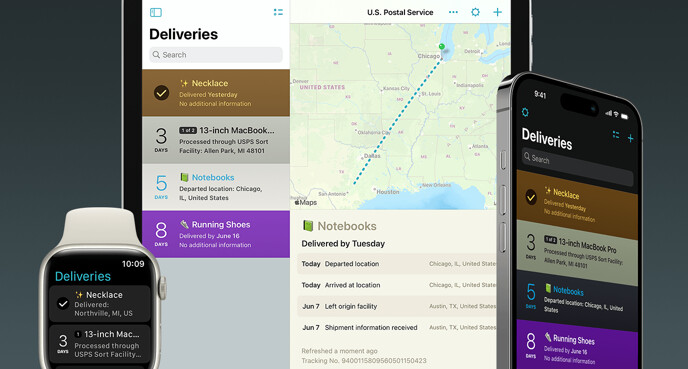
Deliveries helps you keep track of all your packages, so you always know when they’re going to arrive. Whether it’s the latest gadget you’ve preordered online, or a new graphic novel you can’t wait to dive into, Deliveries will keep tabs on it so you don’t miss the doorbell.
The main list shows a summary of all your shipments and counts down the days. Select a delivery for more information, and see where it is on a map. If you like you can view the shipping company’s web page, or easily share your shipment over email, iMessage, or AirDrop. Deliveries can even add estimated delivery dates to your calendar, and a Notification Center widget lets you quickly check your packages without opening the app. All your old deliveries are archived so you can look them up again if you need to.
Deliveries supports dozens of services, including US Postal Service, DHL, TNT, Canada Post, DPD, and many more. You can also track orders from services like Amazon and Apple, even before they ship. (Some services are limited to specific countries—visit junecloud.com/services for details.) If you have packages from other services, just select “Other” and enter a delivery date and web site—so you can check on them when you need to and still keep everything in one place.
Deliveries is also available for Mac. You can sync your deliveries between devices with iCloud or our own Junecloud sync. If you create a Junecloud account, you can add new shipments from any web browser.
Languages
Deliveries is available in English, German (translated by Jennifer Brehm), Japanese (Nobtaka Nukui and Justin McPeak), and French (Applingua).
Update history
New in version 9.6.3:
- Fixed an issue where USPS shipments might fail to update. This issue affected shipments added March 31 to April 1.
- Fixed an issue where USPS shipments might unexpectedly revert to a previous state.
- We recently made some changes on our server that caused the unfortunate side effects above. Now that the issues are resolved, you should see that USPS deliveries refresh faster and are more up to date than ever. We’ve even seen some cases where Deliveries shows the latest status before it appears on the USPS web site. Thank you for your patience while we work on these changes.
- Improved how often DHL shipments refresh.
- Updated copyright dates.
New in version 9.6.2:
- U.S. Postal Service shipments are now updated through deliveries.app. This is a necessary change due to changes with the U.S. Postal Service tracking system. For more information, visit juncld.com/e3WX
- Updated for changes to Amazon.
- Updated copyright dates.
New in version 9.6.1:
- Fixed missing delivery dates for some Amazon orders.
- Fixed missing status for some Amazon orders, particularly for items that had not shipped yet or were returned.
- Fixed missing items names for Amazon orders when using the Add to Deliveries extension.
New in version 9.6:
- Updated for iOS 18.
- Improved dark mode and tinted icon on iOS 18.
- Improved the appearance of widgets on tinted home screens on iOS 18.
- You can now translate tracking information from another language. Tap the “…” icon, then “Translate.” Requires a download the first time each language is translated. Translations are done locally on your device. iOS 18 or later is required.
- You can now add Deliveries to Control Center. Buttons are available to open Deliveries, add a delivery, or open the barcode scanner. iOS 18 or later is required.
- App Shortcuts are now available automatically, so you can ask Siri to “Check my Deliveries” without any setup. Tap the gear icon and then “Siri Shortcuts” to see all the available options. Requires iOS 17 or later.
- Shortcuts on iOS 17 or later are much faster and have a number of minor improvements.
- When “Add to Calendar” is enabled, Deliveries will now ask for full access to your calendars on iOS 17 or later. This is necessary for Deliveries to update your calendar events automatically.
- Improved support for StandBy mode on iPhone, and lock screen widgets on iPad.
- Updated for changes to Amazon and GLS.
- PostNord tracking requests are now handled through deliveries.app. juncld.com/e3FC
- Purolator tracking information is no longer available in the app. juncld.com/e3Gm
- Improvements for Apple orders, particularly after an item has shipped.
- Added support for Apple order numbers that start with an A.
- Improved date detection for Apple Japan.
- USPS order numbers for free COVID tests are now recognized.
- Fixed an issue where some DHL shipments were incorrectly marked “delivered.”
- Fixed an issue where you might have seen an “Invalid IP Address supplied” error for USPS deliveries.
- You can now use LaserShip tracking numbers with OnTrac.
- Updated the OnTrac color scheme to match their new branding.
- Fixed an issue where some shipments might show duplicate packages, while others would be missing.
- Fixed a bug where tapping a “1 of 2” package badge on iPad didn’t work as expected.
- Fixed a bug where the buttons in the subscription view were not always in the intended order.
- Fixed a bug where the App Icon settings did not always appear correctly.
- Fixed some cases where URLs with numbers in them were interpreted as tracking numbers.
- Fixed an issue where search suggestions might disappear unexpectedly.
Apple Watch:
- The Deliveries list has been redesigned and is now in color.
- Siri shortcuts on Apple Watch now show the relevant deliveries in the Siri response.
- Fixed an issue where text in some watch face widgets was too small.
- Minor updates for watchOS 10.
New in version 9.5.1:
- Fixed a crash and other issues that could happen when updating the “Add to Calendar” view.
- Fixed a crash that could happen when updating from an earlier version.
- Fixed a crash that could happen when the app is closing.
- Improved date detection for Apple Japan.
New in version 9.5:
- UPS tracking information is no longer available in the app. You can now manually enter a delivery date for UPS shipments, and you’ll get a notification on the delivery date at 9AM as a reminder. You will need to use the “view details online” button to check the status. As a reminder, here’s our statement from last year on the future of Deliveries: juncld.com/e3Gm
- Search has been redesigned to work in a more standard way.
- The Add Delivery view has been improved, so you can see more of the text, and it’s easier to review your choices.
- The iPad layout has been refreshed, with a consistent sidebar button in the upper-left corner, and a swipe gesture to reveal the sidebar. The settings button has been moved to accommodate this change.
- Keyboard navigation is significantly improved on iPad.
- Drag and drop has been improved. For example, you can now drag a delivery into the Files app to create a deliveries file.
- Settings views are no longer dismissed automatically after changing them (for example the sort view).
- Signing in to Junecloud is easier if your account is saved in iCloud Keychain.
- Improved performance when iCloud is temporarily unavailable. Previously this could reset iCloud sync, which can be a slow process with a lot of data. Now it will no longer reset unless you turn off iCloud sync or the database is reset.
- Fixed an issue where a background update or extension update might stop before all the work was complete. This was especially noticeable in the “Add to Deliveries” extension—it would fail to update and sync the delivery you just added.
- Improved the appearance of map routes in cases where a package goes back and forth between two locations.
- Updated for changes to OnTrac, Canada Post, and Aramex Shop and Ship.
- Improved date parsing for Amazon. Overnight deliveries should show the correct dates now.
- Improved order detection on apple.com.
- Improved mapping for DHL.
- Worked around an issue where iOS would ask to save your Junecloud password to the keychain even if you had tapped cancel, or the password was incorrect. This bug also caused two different prompts when signing in successfully. Now you should only be prompted to save a valid password, after a successful sign in.
- Fixed an issue where the app didn’t update immediately after turning on iCloud or Junecloud sync.
- Fixed issues with password autofill when importing from a site or signing in to a service.
- Fixed a crash when creating a new Junecloud account.
- Fixed a crash that could happen when adding a placeholder with certain URLs.
- Fixed a crash when saving a password from a web view.
- Fixed some other possible crashes.
- Some of the oldest code in Deliveries has been rewritten for better performance.
- Improved how logs are written to disk, making it more efficient.
- Support for the old style of Today widget has been removed.
- Some other minor adjustments.
- Note: iOS 14 or later is now required.
Apple Watch:
- Complications have an improved design on watchOS 9 or later.
- You can now select a specific delivery for watch face complications on watchOS 9 or later. You can even show different deliveries in different complication slots, or on different watch faces.
New in version 9.4.1:
- Fixed a bug where calendar events may not have updated after a delivery date changed to an earlier date.
- Fixed a bug where map routes might have displayed in the wrong color.
- Improved the Japanese text on shared images.
- Fixed repeated crashes in the Apple Watch app on watchOS 8 and earlier.
New in version 9.4:
- Updated for iOS 16 and the latest devices.
- Lock Screen widgets are now available on iOS 16. Your next expected delivery is shown by default. When you’re editing your Lock Screen widgets, you can tap on a Deliveries widget you’ve added to change which delivery is shown.
- You can now manually enter a delivery date for shipments from services we are no longer able to support. These shipments can also be manually marked as delivered.
- Deliveries will now show a notification on the day they’re expected, including shipments with a manually entered date. This notification will be delivered at 9AM, unless there was already a notification earlier that morning.
- Improved clipboard detection on iOS 16. If Deliveries frequently asks for permission to access to paste from other apps, make sure you have iOS 16.1 or later installed. Tap the gear icon, tap “Clipboard Detection”, then tap “Open Settings”. Then tap “Paste from Other Apps” and select “Allow”.
- The online view is now shown as an overlay you can swipe down to dismiss. This makes it faster to return to the app if you’ve opened any links on the site.
- Added support for scanning Codabar barcodes, which are often used by FedEx and Yamato, for example. This feature requires iOS 15.4 or later.
- Improved performance of the barcode scanner, particularly on older devices.
- If you use Mail to Deliveries, you can now review messages that were recently forwarded to your account. Visit junecloud.com/sync, sign in, tap the gear icon to open the settings, then choose “review recent messages”.
- If you’re signed into a Junecloud account, there’s now an option to delete your account in the sync settings.
- Fixed issues with creating an account in the app.
- Fixed issues with item name detection when importing from Amazon.
- Fixed an issue where some characters, like a closing parenthesis, were unintentionally removed from the end of the item name.
- Fixed a bug where certain characters (like tabs) in the item name would cause an unexpected “fill out all required fields” error. Characters that aren’t allowed are now replaced with spaces.
- Fixed a bug with iCloud sync that could result in delivery settings unexpectedly reappearing, particularly dates.
- Fixed a bug where map routes might be the wrong color.
- Made an adjustment to how data syncs in to the app, so it’s less likely to cause issues with future versions when a service is added or changed.
- Some other minor improvements.
Apple Watch:
- Updated for watchOS 9 and the latest devices.
- The large rectangular complication has an improved design that includes the current status of your package, just like our new Lock Screen widget for iPhone.
- Placeholders and deliveries from unsupported services can now be marked as delivered on Apple Watch.
- Improved the appearance of notifications.
- Note: watchOS 7 or later is now required.
New in version 9.3.2:
Fixed issues with FedEx.FedEx is no longer supported.
New in version 9.3.1:
This update fixes a crash that could happen when opening the app. We have also fixed an issue on our server caused some purchases to expire unexpectedly. The previous update included enhancements for iOS 15, improved sharing, and more. For full details, visit juncld.com/e39G
- Fixed a crash that could happen when opening the app.
- Updated copyright dates.
New in version 9.3:
- Updated for iOS 15.
- Sharing a single delivery via Messages is greatly improved. You now get a perfectly formatted link with the name of the delivery. If there’s a location, the link preview will show the map. If there’s no location, it will show the Deliveries icon.
- Sharing via AirDrop now sends a link instead of a file, so it’s easier to share with someone that doesn’t have the app.
- Sharing multiple deliveries now shows an accurate preview with a file icon and the number of deliveries being shared. It works more consistently and just shares a file in most cases. It also works with more services—for example you can now save to Notes.
- Notifications that a package has been delivered are now marked as Time Sensitive on iOS 15.
- When you use “Hey Siri, share this” or the “Add Link” button in Quick Notes, it will now use a link to share.deliveries.app. This allows those links to open in Deliveries, so they’re better for sharing and you can use them to check on your own shipments.
- Improved keyboard shortcuts and navigation on iPadOS 15.
- The “…” button now uses a standard menu on iOS 14 or later.
- The “…” menu now always shows a “Sign In” option for Amazon orders, in case you need it.
- You can now search for Apple orders using a tracking number for an individual shipment in that order.
- Improved how clipboard detection is handled the first time the app is opened.
- Improved validation of tracking numbers. For example there were certain cases where as USPS number with spaces would give an error instead of automatically removing them.
- Improved validation for FedEx tracking numbers and Apple order numbers.
- Improved support for scanning Poste Italiane barcodes.
- Improved tracking number detection for LaserShip.
- Improved how map views determine what part of the map to show.
- Improved filtering of unwanted numbers when adding from an email.
- Improved the appearance of the subscription view.
- Improved results for “Add multiple deliveries” on Amazon. This is now an easy way to add all orders that have not already been added.
- Fixed a bug where some deliveries might show “delivery date unknown” and no other information when there was an error updating the delivery.
- Fixed a bug where an archived item that was removed from a calendar might be added back.
- Fixed a bug where the “Background Notifications” setting could not be turned off.
- Fixed a bug that could cause the widget to crash and appear blank after upgrading from an earlier version of the app.
- Fixed a bug where deliveries could fail to update after a device was set to a date in the future.
- Fixed a bug in the barcode scanner where the flashlight button was partially visible on devices that don’t support this feature.
- Fixed a bug where the “Show more” button on the “Add Delivery” screen was sometimes cut off.
- Fixed an issue tracking DHL numbers with a dash.
- Fixed an issue where new items did not always appear at the top of the list when using manual sorting.
- Fixed an issue where the app would needlessly sync with Junecloud immediately after a time change.
- Fixed some animation quirks when archiving or deleting an item via a context menu.
- Fixed some quirks with the preview when you press on a delivery.
- Made some adjustments to the barcode scanner to reduce crashes.
Apple Watch:
- Updated appearance for watchOS 8.
- Support for Apple Watch Series 7.
- On Apple Watch models with an always-on display, the app will now dim to conserve battery instead of blurring out.
- When the current location is unknown, the map will now center on the previous location when possible.
- Fixed a bug where the “Updated…” text at the bottom might be cut off.
- Fixed a bug where the app might freeze when scrolling down the detail view on watchOS 8.
- Fixed a bug where some data was not saved correctly, which could result in missing data after archiving a delivery on Apple Watch.
New in version 9.2.1:
This update fixes some common issues with our previous update, which included many other improvements. For full details, visit juncld.com/e39G
- Fixed an issue where the app might get stuck “updating” if it was unable to upgrade the database from an older version. In most cases the app is now able to upgrade the database. If it is still unable to, the problem is now handled automatically, and a new, empty database is created.
- Improved the upgrade process to minimize freezes or crashes when handling a large database.
- Fixed a crash that could happen if Handoff was used before the app had a chance to upgrade its database.
- Fixed an issue that prevented suggestions from showing on the Add Delivery screen.
- Fixed an issue where the app might needlessly download an older service update than the one included with the app.
- Fixed an issue where parts of the app’s update process (like refreshing deliveries or syncing) might not work if the startup process was interrupted. This situation is now handled automatically.
New in version 9.2:
This is a significant update, though many of the improvements are behind the scenes. There are a large number of improvements to reliability and performance, and many smaller changes to make Deliveries easier to use.
- Sharing a delivery now includes a link to deliveries.app that makes it easy for the recipient to add the item to Deliveries or view the tracking page online. If you use a “copy” action you’ll get the same info as before, with a link directly to the carrier’s tracking page.
- The barcode scanner can now detect tracking numbers in text. It’s also faster and better at ignoring unwanted barcodes.
- DHL shipments are now updated through deliveries.app for improved reliability and efficiency. For more about this change, visit juncld.com/e3FC
- “DHL Express” is now labeled “DHL”, and supports most DHL shipments. “DHL GlobalMail” is now labeled “DHL eCommerce”.
- Improved suggestions when adding a new delivery.
- Improved how the Add Delivery screen shows deliveries detected on the clipboard. This simplifies the options available and allows you to dismiss the clipboard suggestions if that’s not what you wanted.
- If there are multiple tracking numbers on the clipboard, Deliveries can detect all of them.
- Improved how items with multiple packages refresh. For example if you have an order with one package that was already delivered, that shipment is no longer refreshed along with the others.
- Maps for deliveries with multiple packages now emphasize the selected package. Maps in notifications focus on the route that’s relevant to the notification.
- Map views are more efficient, and better at handling errors looking up locations. They’re less likely to animate unexpectedly while you’re adjusting the view, and they look a bit nicer too.
- Creating a placeholder with the current date no longer automatically marks it as delivered. You can use the “Mark Delivered” button afterward if necessary.
- Improved how parts of the app communicate with each other, for more immediate updates.
- Improved syncing reliability.
- Improvements for signing in to third-party services.
- Item name suggestions are now ordered by when they were last used.
- Fixed an issue where choosing an “edit an existing delivery” option on the Add Delivery screen might leave that item archived after saving. Now this will always show a “Restore” button. You can still edit the name of an existing delivery without restoring it if you use the search field to find it, open the “…” menu, and choose “Edit”.
- Improved how the subscription view shows previous purchases.
- Improved tracking number detection for Chronopost, DHL, La Poste, and UPS.
- Improved link detection for DHL, USPS, and Swiss Post.
- Improved importing from UPS.
- Improved the appearance of the widget in situations with limited information.
- Calendar events include the tracking number and link, and titles are limited to 64 characters.
- The “open the app to resume background updates” notification will no longer appear if you don’t have any deliveries.
- Fixed an unexpected error if you used certain characters in the Item Name field, like the chef emoji.
- Localization improvements.
- Fixed many different causes of crashes, and other reliability improvements.
Apple Watch:
- The Apple Watch app has been completely rewritten, with many small improvements.
- Improved syncing reliability.
- If iCloud sync is enabled, and you have another device with Deliveries installed, the Apple Watch app can show notifications even when your iPhone is unavailable.
- The largest text size setting now uses an alternate layout for improved accessibility.
- The complication for the Extra Large watch face is improved on Apple Watch Series 4 or later. It now uses a “gauge” style that includes a circular progress meter.
- Note: maps on Apple Watch now require watchOS 7 or later.
New in version 9.1.2:
- Fixed an issue where those who previously purchased Deliveries may have been asked to subscribe when trying to add a new delivery.
- Improved subscription verification.
- If you’re using Junecloud sync and your subscription expires, the subscription screen may appear when you launch the app. If you turn off Junecloud sync this will no longer appear.
- The barcode scanner now has lines marking the center of the area, which can help with scanning longer barcodes.
- Fixed an issue where copying a delivery included the link twice.
- Adjusted how often some deliveries refresh. This mainly affects deliveries that haven’t changed in a while. For example if a delivery doesn’t have a date and hasn’t changed in over a week, it will update less often.
- Improved handling of errors when updating deliveries.
- Improved tracking number validation for UPS and USPS.
- Improved tracking number detection for La Poste.
- Improved link detection for amazon.com, ups.com, usps.com, sagawa-exp.co.jp, and others.
- Improved handling of iCloud errors.
- Fixed some minor issues in the German localization.
New in version 9.1.1:
- Faster text entry: the Add Delivery screen now uses the number keyboard by default. On the Edit Delivery screen, the item name field is selected automatically if it’s empty.
- Improved widget refreshing: it’s more efficient and more reliable.
- Fixed an issue where the app might get stuck due to an iCloud problem.
- Updated support for DHL Germany.
- Improved tracking number validation for Poste Italiane.
- Fixed an issue where the contact form sometimes failed without an explanation if the name field was left blank.
- Some other minor bug fixes.
New in version 9.1:
- New widgets for iOS 14.
- Updated for the latest devices.
- Improved tracking number validation for USPS and Chronopost.
- Fixed an issue where “Import from a web site” did not always detect deliveries on the page.
- Fixed an issue where “Import from a web site” showed the results in the wrong order. Now deliveries at the top of the page should appear first.
- Improved importing from UPS.
- Improved syncing with Apple Watch. This fixes an issue where items might continue to show on Apple Watch after they were archived or deleted.
- Fixed an issue with the Apple Watch complication. Previously if all of the today’s items had been delivered, the complication would count down until the next delivery. Now it will show a checkmark until the day ends, or all of the delivered items are acrhived.
- Improved date detection for Apple orders.
- Improved date detection for Amazon when the language is not set to the default.
- Fixed unexpected errors checking Hermes and Posten shipments that do not have any information available.
- Fixed an issue where some Hermes shipments would continue to show the estimated delivery date instead of the actual delivered date.
- Fixed an issue where “restore purchases” did not always work as expected.
- Fixed a bug where a previous purchase was not always recoginized, or a complimentary subscription would show an incorrect date.
- Fixed a possible crash when showing the detail view.
- Placeholders no longer count toward the maximum number of deliveries.
- A few other minor bug fixes.
New in version 9.0.2:
- Fixed an issue where iCloud sync did not work correctly for some people, particularly those who recently used the app for the first time.
- Fixed an issue where some UPS tracking numbers could not be added, with an incorrect message that the number was not valid.
- The “Restore Purchases” button is now shown on the Subscription screen if you have a complimentary subscription. This will refresh the expiration date if the incorrect date is shown.
- The “Name” field when filling out the contact form or registering for a Junecloud account now has an option to enter your name with one tap, and has better autocorrect and capitalization behavior.
New in version 9.0.1:
- Fixed an issue where some purchases were not recognized by the app.
New in version 9.0:
- A fresh look: We’ve touched up every detail to make it easier to keep track of your shipments. Dark mode is included, and support for all text sizes is improved.
- Subscriptions: Try Deliveries for a month to see if it works for you, or subscribe yearly for a significant discount. One subscription gives you access to Deliveries on iPhone, iPad, Mac, and Apple Watch. If you previously purchased the app, you’ll still get most features for no extra charge. Learn more at juncld.com/subs
- Tracking history: For most services, the full history is shown in the app, and it’s archived with the delivery if you ever need to look it up.
- Easier to add deliveries: It’s faster to add new shipments, with improved suggestions, and an “import” option to add multiple shipments from popular sites.
- Drag and drop: Rest your finger then drag to reorder deliveries. On iPad, drop emails, links, or text onto the app to add shipments. You can also drag deliveries to other apps, like Files or Safari.
- Multiple selection: Tap and drag with two fingers to select, then archive or share several items at once. You can also use the select button to select items one at a time. If you accidentally delete something, swipe left with three fingers to undo, shake your device, or press ⌘Z on an external keyboard.
- Sync: Both iCloud and Junecloud are faster and more reliable. You can also use both, for the benefits of iCloud without missing out on Junecloud features like “Mail to Deliveries” and web access.
- Export: Save a complete backup of your active and archived items. Tap the gear icon, tap “Manage Your Data”, then “Export Deliveries”. You’ll get a single file with everything, so it’s easy to share or re-import later.
- Placeholders: Previously labeled “Other”, placeholders now include buttons to quickly edit them or mark them as delivered.
- Dates: The year is now shown for dates further away. On the details screen, tap on a countdown like “delivered in 5 days” to see the actual date.
- Item name suggestions: Type a few letters and Deliveries will suggest previous item names.
- Help with mistakes: As you enter information, small mistakes like extra spaces are cleaned up automatically. If you try to save a delivery with an invalid tracking number, the app will let you know, so you can fix the typo or choose a different service.
- Archived items: They’re no longer dimmed out, so they’re easier to read. You can also edit item names without restoring.
- Source details: Deliveries added through email or Safari now include information about where they came from. Tap to open the email or web page.
- Sorting: Your manual sort order now syncs with iCloud.
- Siri Shortcuts: The “check on a delivery” shortcut can now be used conversationally to check any of your active deliveries. In the Shortcuts app, the “Add a Delivery” action now accepts input, and most actions output information about your packages.
- Improved keyboard support: Use the arrow keys to select a delivery, or to select a suggestion when adding a new delivery.
- Quick Look: Exported files can be previewed in Spotlight or the Files app.
- Clipboard detection: Like before, Deliveries can automatically detect tracking numbers on your clipboard so you can add them easily. If you prefer, there is now an option to turn this feature off.
- The “Add to Deliveries” extension has moved—look for the color icon in the Share sheet.
- Data Matrix barcodes are now supported. These are sometimes used for Amazon return codes, for example.
- Many other improvements to performance and reliability.
- Note: iOS 13 or later is required.
Apple Watch:
- A fresh look: See more information at a glance.
- The Siri watch face will remind you of upcoming deliveries.
- iCloud sync keeps your deliveries up to date even if you’re away from your phone.
- Syncing with iPhone is faster and more reliable.
- Note: watchOS 6 or later is required.
New in version 8.4.6:
- Fixed a bug where parts of the app displayed incorrectly in dark mode. We have a major update coming soon with full support for dark mode, and many other improvements.
New in version 8.4.5:
- Fixed issues with UPS.
- Fixed an issue where some LaserShip shipments were not marked as delivered.
- Added locations for Post Austria, when available, and improved error handling.
- Improved mapping for Canada Post.
- Note: If you use Junecloud Sync, you’ll need to sign in again after installing this update. You may need to re-enter any passwords that were previously saved. We’re very sorry for the inconvenience.
New in version 8.4.4:
- Improved results for La Poste, Apple, and Amazon.
- Improved link detection for Post Austria.
- Improved HLG tracking number detection.
- Updated for compatibility with future service updates.
New in version 8.4.3:
- Fixed issues with Purolator.
- Fixed an issue where the “Add to Deliveries” extension might add too many items to Amazon orders.
- Improved detection of tracking numbers in links.
- Improved tracking number detection for Purolator and FedEx.
New in version 8.4.2:
- Fixed an issue where Siri might refer to “your %@ delivery”.
- Fixed an issue where adding a Siri Shortcut might suggest using a phrase like “pIcFtB”.
New in version 8.4.1:
- Fixed an issue where certain Amazon orders could get stuck, preventing other deliveries from updating.
- Fixed an issue with USPS tracking numbers that include unexpected characters, like commas.
- Fixed an issue decoding the characters æ and Æ in Amazon item names.
- Connections to dhl.com now use HTTPS, and various links to tracking details have been updated to HTTPS.
- Improved link detection for PostNL.
- Links in sharing emails now go to deliveries.app instead of our previous site.
- Fixed a bug where the Deliveries icon did not load in sharing emails.
- Fixed a bug where rich notifications were too tall on iPad.
- Fixed a possible crash when scanning barcodes.
- Fixed a minor issue with future iOS versions.
New in version 8.4:
Siri Shortcuts:
- The Siri shortcut “check my deliveries” now includes a summary of your deliveries as well as your next delivery date, so it’s more useful on Apple Watch, HomePod, and in other situations. (The suggested phrase was previously “show my deliveries”—of course you can use any phrase you like.)
- Siri responses are now shown with the same colors used in the app.
- Siri Shortcuts are now available in German and Japanese.
- Improved Siri responses when you do not have any deliveries.
- You will no longer get Siri suggestions for deliveries that have been archived or deleted.
- The Siri Shortcuts section of the app’s settings will no longer suggest shortcuts you’ve already set up.
Barcode scanner:
- Added support for QR codes from the U.S. Postal Service. QR codes for other services should also work if the tracking number is included in the content of the code.
- Improved barcode recognition for DPD.
Calendar events:
- Improved cleanup of duplicate calendar events when multiple devices add events to the same calendar.
- Fixed a bug where events were duplicated on Exchange calendars, and Deliveries was not be able to clean up the duplicates. You will need to manually remove any existing duplicates.
- Fixed some cases where Deliveries might forget which calendar you had selected.
- Fixed a bug where color dots might be missing in the Calendar settings.
And more:
- Fixed a bug on Apple Watch where the list of deliveries did not update correctly after archiving a delivery.
- Fixed a bug on Apple Watch where the view did not update correctly after changing the selected package.
- Fixed an issue where deliveries were not always sorted correctly in the Today widget.
- Updated for changes to La Poste, Posten Norway, OnTrac, and TNT.
- Improved results for Apple and DHL.
- Improved link detection for Hermes, Posten, Swiss Post, and Yamato.
- Improved mapping for USPS and Swiss Post.
- Improved clipboard detection.
- Fixed issues with item name detection when using the “Add to Deliveries” extension on smile.amazon.com.
- The “Updated…” text is now based solely on your active deliveries, which should better match what you’d expect.
- Improved handling of deliveries that sync in from services added in future versions of the app.
- Added support for future service updates.
- Some other minor improvements.
New in version 8.3:
- Siri Shortcuts: you can now use Siri to find out when your next delivery is, check on all your deliveries, or add a new one. To get started, tap the gear icon, then Siri Shortcuts, and add a new shortcut.
New in version 8.2.1:
- Fixed crashes that could happen on Apple Watch Series 3 and earlier.
- Improved support for DPD barcodes.
New in version 8.2:
- Added support for the new iPad Pro.
- Improved date detection for Amazon.de and Amazon.es.
- Improved link detection for DHL and TNT Express Australia.
- Improved tracking number detection for Hermes.
- Fixed a bug where complication previews in the Watch app for iPhone did not always display correctly.
- Fixed a bug where the service update version was not always updated correctly.
- Fixed some minor layout issues.
- Updated to the latest version of the 1Password extension. Note: 1Password users with iOS 12 can enable AutoFill for the best results.
New in version 8.1:
- Added support for iPhone XS Max and iPhone XR screen sizes.
- Added support for Apple Watch Series 4, including complications for the Infograph watch faces.
- Improved results in the Add to Deliveries extension, especially on Apple, Amazon, and Etsy pages.
- Improved tracking number detection for Post.at and TNT Express Australia.
- Improved handling of unexpected errors.
- Improved parsing of Italian dates.
- Improved compatibility with future service updates.
- Improved security requirements for connections to LaserShip, OnTrac, and TNT Express Australia.
- Fixed a bug where buttons in the navigation bar might stop working if there was an error saving.
- Manually checking for service updates will no longer delete the installed update until the new one is downloaded and verified.
- Added support for files created by future versions of the app.
- Note: the Apple Watch app now requires watchOS 3.0 or later.
New in version 8.0.9:
- Fixed some animation quirks when archiving a delivery.
- Fixed a bug where opening the app from the Today widget might show the clipboard prompt and then immediately dismiss it.
- Fixed a bug where the app would needlessly sync at midnight.
- Updated link detection for Canada Post and DPD Germany.
- Some other minor optimizations.
- You can now download or delete your iCloud data or your Junecloud Sync data.
New in version 8.0.8:
- Fixed problems with Chronopost, DHL Germany, and Hermes.
- Improved barcode scanning for USPS.
- Improved link detection for Australia Post, Hermes, and others.
- Improved password autofill.
- Some other minor bug fixes and improvements.
New in version 8.0.7:
- Fewer sign in prompts for most Amazon deliveries, and other improvements to the sign in process.
- Fixed a bug where the Today widget might crash or reload repeatedly.
- Fixed an issue on iPad where the rating prompt would display incorrectly in Split View or Slide Over, obscuring the app.
- Improved URL recognition for DHL Germany.
- Some other minor improvements to URL detection.
- Some minor, behind-the-scenes maintenance.
New in version 8.0.6:
- Improved barcode scanner: it’s easier to scan the right barcode, and the focus adjusts automatically. Still having trouble? Try rotating your device to landscape for long barcodes, or tap on the barcode to lock focus.
- Improved support for iPhone X.
- Improved sign in reliability on iOS 11.
- Improved link detection.
- Removed excess padding in the Today widget on iOS 11.
- Reduced accidental taps in the Today widget.
- Fixed a crash when using the “Save Image” share option on iOS 11.
- Fixed a crash when viewing an “Other” delivery with an invalid web site address.
New in version 8.0.5:
- Now compatible with iOS 11.
- Improved results for Amazon and Apple orders when you use Add to Deliveries in Safari. Deliveries also recognizes more URLs from these services.
- Improved tracking number detection for DPD.
- Fixed a possible crash when clearing saved passwords.
New in version 8.0.4:
- FedEx is now supported in more languages.
- Fixed a bug where your Junecloud password was not always saved to iCloud Keychain when it should be.
- You may be asked to rate Deliveries after archiving a delivery. It only takes two quick taps and you won’t see it often. Your feedback means a lot to us, and we’re always hard at work on more improvements. Thank you!
- Fixed a few minor bugs.
New in version 8.0.3:
- Updated for changes to PostNord (Sweden and Denmark). We apologize for the unacceptably long delay in fixing this.
- Improved tracking number detection for PostNord, Posten Norway, and LaserShip.
- Improved support for Amazon’s mobile site in the “Add to Deliveries” extension.
- Fixed a bug where the Add Delivery screen did not always show the expected results. For example, “1LS00000000 lasership” will now suggest adding a LaserShip delivery, even though the number by itself is not detected as a LaserShip number.
- Fixed a bug where the “Sign in required” button wasn’t translated.
- Improved iCloud compatibility with future versions of the app.
New in version 8.0.2:
- The “background notifications” setting is now disabled if Deliveries does not have permission to display notifications. This permission can only be changed in the Settings app, so you will see a message telling you how to change it.
- Improved suggestions when adding a delivery, particularly if you’re using the “Add to Deliveries” extension. Some incorrect suggestions will no longer appear, and better results appear higher in the list. You’ll also always see an “Other” option at the end if you’re adding a URL that Deliveries doesn’t recognize.
- Entering an Amazon Logistics tracking number will now show “Amazon - by tracking link” as a suggestion. It’s not possible to track these shipments using the number alone, so you’ll need to paste in the address of the “Track Package” page.
- When you add an “Amazon - by tracking link” shipment there’s now some text at the bottom of the screen explaining what you need to enter.
- When you sign in to a service, you’ll be asked if you’d like to save your password, so it can be filled in automatically next time.
- You will no longer be prompted to add a delivery from your clipboard if it has already been added.
- Updated for changes to Poste.it.
- Improved tracking number detection for DHL Germany and TNT.
- Improved barcode scanning for Canada Post.
- Improved flexibility of country code entry for PostNL. It can now be before the postal code, after it, or even by itself if a postal code isn’t required.
- Improved URL detection for certain web sites like internationalparceltracking.com and poste.it.
- Improved mapping for some services.
- Fixed a bug where the correct delivery was not always displayed after using Handoff or opening the app from a URL.
- Fixed a bug that could cause duplicate notifications when using the “Add to Deliveries” extension.
- Fixed a bug where a delivery might refresh needlessly before you had a chance to sign in.
- Fixed a bug where changing a delivery from one service to another might carry over information to a completely different field. (You might have wound up with an email address in a “web site” field, for example.)
- Improved security requirements for third-party services.
- Fixed several possible crashes, and improved performance a bit.
New in version 8.0.1:
- Tapping the help button in the sync settings now works correctly instead of crashing.
- Fixed some possible causes of crashes when the app tried to send data to Apple Watch.
- Fixed a possible crash when adding a delivery.
- Archived deliveries no longer show a “sign in required” button, if they were archived while that error was showing.
New in version 8.0:
- Updated for iOS 10 and watchOS 3. watchOS 2.2 is also supported.
Notifications:
- Press on a notification for more information and a map. (On a device without 3D Touch, swipe left and tap View.)
- Old notifications are cleared out automatically, so you only see the latest details.
- If you turn off Background App Refresh in the Settings app and then turn it back on later, background updates will resume automatically.
- Item names no longer show twice in notifications.
Today widget:
- The Today widget shows a single delivery by default, with a “Show More” button to reveal as many as possible.
- The Today widget now updates on its own, even if Background App Refresh is off.
- On a device with 3D Touch, press the home screen icon to see the first delivery in your list.
Apple Watch:
- The Apple Watch app can update in the background on watchOS 3, so it’s up to date as soon as you open in it.
- Reliability and performance is greatly improved on all supported versions of watchOS (2.2 or later).
- Improved the display of multicolor complication icons on watchOS 3.
Adding deliveries:
- Improved suggestions when you add a delivery.
- Swipe a suggestion on the Add Delivery screen to hide it. Hidden services will no longer show as suggestions unless that’s the best guess we have. You can always find hidden services by choosing “More Options”, selecting “From”, and then “Show All Services”.
- The “Add to Deliveries” extension now syncs and updates immediately.
- The “Add to Deliveries” extension automatically fills in item names for “Amazon - by tracking link” deliveries. Just go to Amazon’s “Your Orders” page in Safari, tap the Share button, and choose “Add to Deliveries”.
- Improved tracking number detection for GLS, LaserShip, PostNL, and Yamato.
- Improved recognition of UPS and PostNL links.
- Improved support for Universal Clipboard, if you copy tracking information on one device and then open Deliveries on another.
Calendar:
- The list of calendars is grouped by source (for example, iCloud or Google).
- Fixed a bug where calendar events were updated more often than they should have been. This was especially noticeable with shared calendars, because you’d get frequent notifications about events being updated.
Stickers:
- If you’re sharing a delivery with iMessage, you can add one of our package pals for a bit of character.
And more:
- On iPhone 7 you’ll now get subtle haptic feedback for various actions.
- The refresh status of a delivery is now shown on the right side of each delivery in the list, so the progress indicator is less obtrusive. When Deliveries is unable to update the status, you’ll see an alert icon. For an Amazon delivery, this often means that you need to sign in.
- Improvements to Amazon sign in. If you still have problems, please visit juncld.com/e3D8 for new troubleshooting options.
- If a delivered item can no longer be found online, Deliveries will keep the last known details instead of showing a “not found” error. We do still recommend you archive deliveries that no longer need to be refreshed.
- If you restore an archived delivery that’s no longer available online, it will continue to show the last known details, so you don’t lose any information.
- Improved support for Dynamic Type.
- If you search for deliveries in Spotlight, you’ll see a “Search in App” button so you can see more results in the app.
- Improved some icons and other visual refinements.
- Many improvements to stability and performance.
- Note: if you are updating from Deliveries 5.2.1 or earlier, your existing deliveries and settings will be lost.
New in version 7.1.3:
- Updated the Amazon sign in process. Instead of entering your password in the settings, you’ll now see a “sign in required” button when Amazon needs you to sign in again. When you add deliveries by order number, we recommend only adding deliveries from one Amazon account at a time.
- Added an option to look up Amazon shipments using a tracking link, without having to sign in. Just paste the address of a “Track Package” page or email link, or use the “Add to Deliveries” extension, and Deliveries will show a new “Amazon – by tracking link” option. Tracking a shipment this way won’t show information about other shipments in the order, and some orders can’t be tracked this way.
- The “Add to Deliveries” extension now includes more choices. If there are multiple tracking numbers or order numbers on the page, you can now choose which one to use.
- Improved tracking number detection for LaserShip.
- Improvements for UPS and Amazon.it.
- Mapping improvements for Canada Post, DHL, and Swiss Post.
- Improved syncing with past and future versions of the app. It will try harder not to mess up a delivery from a newer version of the app from a service it doesn’t recognize. It will also ignore invalid changes to a delivery if an older version does mess up a delivery.
- Fixed a bug where the “Look Up in Safari” button would sometimes do nothing instead of showing an error.
- Updated 1Password support.
New in version 7.1.2:
- All of the Apple Watch complication types are now supported, so you can add Deliveries to any available spot on your favorite watch face.
- Links from Amazon emails are recognized correctly again, plus improved detection of URLs for AusPost and DHL Germany.
- Selecting Amazon and entering anything other than an order number will now show a message explaining the problem. Amazon order numbers are always in the format 000-0000000-0000000.
- Archiving a delivery on Apple Watch will now remove it immediately, instead of waiting for your iPhone to archive it and report back.
- Fixed some bugs from the future, before they even happened. 3D Touch will work more reliably, and it won’t crash when you tap Share.
- Minor performance and stability improvements when syncing with iCloud or updating the map.
New in version 7.1.1:
- Fixed a crash on iOS 9.2.1 and earlier.
- Improvements for Amazon.es, Amazon.it, and UPS InfoNotice numbers.
New in version 7.1:
- watchOS 2: You can now add Deliveries to your watch face. The app is also much faster, and keeps the latest info about your deliveries directly on your Apple Watch. The watch app now requires watchOS 2.2 or later.
- Redesigned clipboard detection: we know many of you thought the previous change was a step back. This new design is as obvious and easy to use as the original alert, but faster to dismiss when it’s incorrect.
- Smarter guesses: In many cases you’ll now get better shipping company suggestions when you paste in a tracking number or URL. In particular, EMS numbers will now show additional options where you may be able to track your shipment. You should also see fewer incorrect guesses.
- Defaults: When the app is installed for the first time, it now selects some default favorite services based on your region.
- Troubleshooting: Deliveries with a “Not Found” error now include a button to show some troubleshooting tips.
- Improved mapping to more accurately display the route your package has taken as well as its current location.
- Improvements for Amazon sign in. You may need to sign in again—once on each device—after the update.
- Improved date display for Amazon.
- La Poste France no longer specifies that it is only for letters.
- Updated for changes to PostNord.
- When you add a delivery with the “Add to Deliveries” extension, your email or zip is immediately remembered for next time.
- Changed the way tracking numbers are displayed in the “Add to Clipboard” section. This should make it more clear that they are intentionally obscured, and allows you to see their length.
- Deliveries files now include complete details, so you can AirDrop or import an archived delivery without losing any information.
- Emoji in item names are no longer cut off, and other text display improvements.
- Fixed a bug where failed location lookups did not give you the option to set the location manually.
- When you delete a delivery, the warning now includes the name of the delivery you’re deleting, to make it more clear.
- The button to sign in or enter your password now has a lock icon to differentiate it from other errors.
- Improvements for background refresh.
- Fixed a bug where the “Open the app to resume background updates” message might appear when it shouldn’t.
- The alert icon when the widget is out of date is now nicer looking and more accurate.
- Fixed a bug where archived items that were saved with a different language would not sync in.
- Improved “Delivery Date” sorting when you have many items arriving on the same day with sequential item names.
- There’s now a maximum font size. Previously with some “Larger Accessibility Sizes”, text was so big it would get cut off.
- Improved reliability when updating from an older version of the app.
- Updated 1Password support.
- Some other minor improvements to cut down on crashes and make things faster.
New in version 7.0.1:
- You can now add a delivery to Reminders using the Share sheet.
- Text is now included when you share to Notes.
- La Poste now includes Colissimo.
- Improvements for Amazon, Poste Italiane, DPD Germany, and UPS.
- Improved tracking number detection.
- Improved USPS barcode scanning.
- Improvements to Amazon sign in.
- When you copy a delivery and paste it in a text field, the name of the item is now included.
- Fixed a bug where the app might crash when tapping “View details online”.
- If you’re adding an Other delivery and leave http:// off the web site address, it will now be added for you.
- Fixed a bug where opening a .deliveries file didn’t always work.
- Fixed a possible crash when opening files.
- Fixed a bug where the icon badge might not clear after deleting and reinstalling the app.
- A few other minor improvements.
New in version 7.0:
- Peek and Pop: on iPhone 6s or 6s Plus, press lightly to peek at your delivery details. Swipe up for various actions, or press deeper to Pop into it.
- Quick Actions: also on iPhone 6s or 6s Plus, press the Deliveries icon to choose “Add Delivery” or “Scan Barcode”.
- Slide Over and Split View: on a supported iPad, you can now open Deliveries alongside another app.
- iPad Pro support: take full advantage of the big screen.
- See the full route on the map: for many services, you can now see the path of where your package has been in addition to its current location. This makes sharing deliveries more fun too.
- Complete iCloud sync: the entire state of your deliveries is now synced when you use iCloud. That includes the current status, which allows for faster and more efficient updates. It also includes archived and deleted items, so your archive should match across devices. (When syncing the first time, only the past 30 days will be included.)
- Siri reminders: open a delivery, activate Siri, and say something like “remind me about this when I leave from work”. You’ll get a reminder that includes the item name and a shortcut to the delivery.
- Keyboard shortcuts: on an iPad with an external keyboard, hold down the command key to see a list of possible shortcuts.
- More ways to add deliveries: select text in another app (like Mail or Safari), then tap “Share…” to add to Deliveries. Don’t worry about selecting just the tracking number, it should find it if you select too much.
- Spotlight Search: on your home screen, pull down or swipe to the right to find deliveries by item name, shipping company, and more.
- Better clipboard detection: tap the + button and you’ll see suggestions based on your clipboard there. Same number of taps when it’s right, zero extra taps when it’s wrong. The URL detection has also been improved to recognize many new links.
- A fresh look: the new system font is now used throughout, and an adjusted detail view focuses more on the information you care about.
- Print or save a PDF: just tap Share and choose either, along with all our other sharing options.
- “View details online” uses the new Safari view controller on iOS 9.
- For a delivery with multiple packages, you can now tap the “1 of 2” badge in the list to show the next package.
- The “Add to Deliveries” extension will no longer create duplicates.
- The Today widget now makes it clear when there are more deliveries to show in the app, and displays a warning icon if it hasn’t been able to update in the background.
- The badge number on the icon should now roughly match the number of deliveries that have changed, instead of just increasing for each notification. If you archive a delivery from a notification, the Watch app, or on another device, the number will decrease.
- If a delivery changes after it’s delivered, and it’s still showing as delivered, it will no longer trigger a notification. These changes are rarely of interest.
- Minor improvements to the barcode scanner interface.
- New security features in iOS 9 allow the app to enforce minimum security requirements when it connects to each service.
- DHL Germany can now show results in English on iPhone.
- DHL UK tracking is now part of DHL Express.
- Adobe tracking no longer requires a user name and password.
- “Other” shipments no longer check the web site for changes. This feature was confusing and rarely worked well. “Other” is now completely manual—it’s a way for you to keep track of shipments that can’t be tracked automatically.
- Added support for URLs like deliveries://add/http%3A%2F%2Fjunecloud.com, which is useful for apps like Launch Center Pro.
- Added support for the URL deliveries://add/scan to open the barcode scanner.
- When a delivery with multiple shipments is re-ordered, the app should do a better job of keeping your selected shipment showing.
- Improved accuracy of map locations.
- Improved the display of map errors and made the text easier to read.
- Fixed several possible crashes.
- Many other bug fixes and minor improvements.
- Note: iOS 9 is now required.
New in version 6.2:
- All new iCloud syncing is faster and more reliable than ever. Make sure you update Deliveries on all your devices to continue syncing—Deliveries 6.2 for iOS and Deliveries 1.2 for Mac. Alternatively, you can use Junecloud Sync to sync with older versions.
- Improved reliability of Junecloud sync.
- Improved tracking number detection for UPS and U.S. Postal Service.
- Posten Sweden is now PostNord.
- Updated for changes to Poste Italiane.
- Fixed a bug where archiving a delivery from a notification did not always sync that change immediately.
- Fixed a bug where the Today widget would sometimes show even if you didn’t have any deliveries.
- Fixed a bunch of little display issues in the Today widget, particularly on iOS 9.
- Fixed some possible crashes, and a few other minor improvements.
New in version 6.1.2:
- Apple Watch: the Glance has been redesigned to focus on the number of days until your next delivery instead of the number of packages.
- Apple Watch: there is now a progress spinner at the bottom of the screen if the app is busy updating.
- The Add to Deliveries extension is now supported in more apps, including Google Chrome. (Though it does work best in Safari.)
- Previously a delivery would always show the archive button if the delivery date was missing or in the past. This is no longer the case unless the status has not changed in 3 days or more.
- If you paste in a long string of text on the Add Delivery screen—instead of just a tracking number by itself—you’re now more likely to see existing deliveries that match.
- Fixed a bug where tracking numbers immediately followed by a period may not be found.
- Fixed a bug with Amazon where a “sign in required” error might not go away even after you signed in.
- Updated 1Password support.
- Fixed some possible crashes, and several other minor bug fixes.
New in version 6.1.1:
- Fixed a crash when adding a new delivery on iOS 8.0 through 8.0.2.
- Apple Watch: Fixed various problems with Refresh or Archive not working, or the list of deliveries not updating when it should.
- Apple Watch: Fixed a bug where you couldn’t view more than 8 deliveries.
- Apple Watch: Fixed a bug where the “1 of 3” badge might get cut off in some langauges, especially on the 38mm watch.
- Apple Watch: Fixed a bug where the Glance might say “None” at the bottom when there are no other deliveries expected. That line will now be blank in those cases.
- Apple Watch: Fixed a bug where notification text might get cut off at the bottom.
- Improved the display of delivered items that don’t have a lot of information available. These used to show “Shipped! Delivered!” in the list. They will now show “Delivered!” on the first line, and “Delivered [date]” on the second line.
- Improvements for tracking number and URL detection, particularly for U.S. Postal Service and OnTrac, as well as numbers with spaces in them.
- Mapping improvements for certain locations.
- A new Junecloud logo.
- Some other minor improvements and bug fixes.
New in version 6.1:
- Apple Watch: now includes an app, Glance, and notification support for Apple Watch.
- Handoff: if you’re viewing or editing a delivery and you want to switch to another device, you can now use Handoff to take you straight there.
- Sharing: you can now share a snapshot of your delivery, which is fun if you want to tweet about how that pre-order you’re so excited about just shipped. It tries to leave out stuff you probably don’t want to share, like the tracking number and your current location. The email sharing template has also been improved.
- Search: you can now filter your search results by Archived, Active, or All. This gives you an easy way to browse all your archived deliveries—just choose All or Archived without entering any search text. You can also search by delivery date, using the format YYYY-MM-DD. That means you can search for a specific day (“2015-04-24”), a whole month, (“2015-04”), or an entire year (“2015”).
- Multiple packages: deliveries with multiple packages have a new look, to make it more clear what the numbers mean, and which package is currently selected. In the details view, you can now tap anywhere in the text for a package to select that package. Changing the selected package will now highlight its location on the map. Plus when you double-tap to change the selected shipment in the Today widget it will now update in the main app.
- The Add Delivery screen now has section headings to make it more clear what options are available.
- You can now scan a barcode when you’re editing a delivery.
- Syncing improvements for iCloud and Junecloud.
- Better error handling when syncing with Junecloud or checking for service updates.
- Faster downloading of service updates.
- Fixed a bug where deleting a delivery did not remove calendar events related to it.
- If a location in the format “City, State 12345” isn’t found, it will now try again without the zip code.
- Fixed a bug where opening an invalid .deliveries file would automatically add the invalid delivery. It will now open the Edit Delivery screen and ask you to correct any problems.
- Fixed a bug where the day count on the details screen did not always update when it should.
- Pull to refresh will no longer update deliveries that are complete—when all shipments have been delivered. You can still manually refresh a delivered item by tapping the “…” button and choosing “Refresh” there.
- The network activity indicator now displays properly during updates (that’s the tiny spinner in the status bar).
- When you adjust your text size, the icons (like checkmarks) will now scale up or down to match.
- Much better map zooming in many cases. Previously there were a lot of cases where it would be zoomed out more than you would have expected—that is now much less likely to happen.
- Improved caching of map locations.
- Updated 1Password support.
- Many other minor bug fixes and improvements.
New in version 6.0.2:
- Fixed a crash when checking certain URLs for delivery information.
- Fixed a possible crash while searching on iPad.
- Fixed a very weird bug that was messing up autocorrect when sharing via Mail.
- Fixed a bug where the widget might show more deliveries than it should.
- Fixed a bug where text colors didn’t update correctly when changing a delivery from one service to another.
- Fixed URL detection for PostNL links, and improved tracking number detection for LaserShip.
- iCloud improvements.
- Updated 1Password support.
- Links to the app in shared emails now go to deliveriesapp.co
- Some other minor adjustments.
New in version 6.0.1:
- Improvements for background refresh.
- Improved accuracy of map locations. Like before, you can still drag a pin if it’s in the wrong location.
- Clipboard detection is greatly improved. It can now find tracking numbers and URLs in blocks of text, so it’s no longer necessary to get a perfect selection.
- The “Add Delivery” screen is better at finding common tracking number formats in a pasted block of text. It will also show existing deliveries that match a web address, along with other improvements.
- Archived items on the “Add Delivery” screen once again show an item name when possible.
- Fixed a bug where URLs on the clipboard were not always recognized.
- Fixed a bug where you might get prompted to add a delivery on the clipboard that had already been added.
- The “Archive” button is now shown for more deliveries.
- Added back the option to copy by tapping and holding a delivery in the list.
- Improved transition when choosing “More Options…”
- Notification sounds work correctly again.
- Autocorrect is now off for tracking number, email, and web site fields.
- Improvements and bug fixes for Junecloud Sync, particularly when logging in or out.
- Improved the way the map pins are updated which should fix some occasional display problems, and improve efficiency in the background.
- When the app starts up it will now update “stuck” deliveries—those that look like they’re updating but previously were not. This can happen if the app crashed or was forced to quit in the middle of an update.
- In the online view, the share and 1Password buttons are now hidden when they’re not appropriate.
- Fixed a bug where trying to sync Chinese or Japanese text to Junecloud might cause the app to crash.
- Fixed a possible crash or duplicated item when updating the Deliveries list.
- Fixed a possible crash when swiping on the Deliveries view or Add Delivery view.
- Fixed a possible crash when sharing a web page.
- Fixed a possible crash when using the 1Password extension with a web page.
- Fixed a crash that would happen if you tapped in the empty space on the side of a date picker.
- Fixed a bug where URL, email, zip code, and date fields were not properly cleared when switching from a service with those fields to a service without them.
- Fixed a bug where the widget might display the wrong day counts after a time zone change.
- Fixed a bug where a deliveries://add URL with an invalid “from” value would result in the “Add Delivery” screen not displaying correctly.
- Some other minor bug fixes and performance improvements.
New in version 6.0:
- Notification Center: Deliveries now includes a Today widget so you can check on your deliveries right in Notification Center. When you get a notification you can also swipe to the left to archive it without having to open the app.
- Add deliveries faster: just enter the information you have and we’ll give you a list of options. There’s also a nice big button to open the barcode scanner, and it supports more barcode types than before. Best of all, there’s a new “Add to Deliveries” extension for Safari, so you can add new deliveries with just a couple of taps.
- A fresh look: we’ve refined the design to look even more at home on iOS 8, and to match our new app for OS X Yosemite. The layout also does a better job of adjusting to perfectly fit your screen. That includes support for iPhone 6 and 6 Plus—even a great new landscape view on both of them.
- Dynamic type: Deliveries will now show larger or smaller text based on your settings.
- Fewer password hassles: if you have a junecloud.com password saved in Safari, the app will now ask if you’d like to use that when you install it for the first time. If you create an account in the app, your password is saved to your iCloud Keychain so you can log into the site quickly on your Mac. You can also use 1Password’s iOS 8 extension to fill in passwords faster than ever.
- Automatic favorite services: they’re now selected for you as you use them. If one shows up that you don’t need to see anymore, just swipe it and tap to hide it.
- A new name: I know what you’re thinking. “It’s still called Deliveries! It says right there on the app!” Well, that actually wasn’t the name before. But it is now. Don’t worry about it.
- So many little things: Improved iCloud support, especially with accounts that have iCloud Drive enabled. We made a bunch of things more efficient. Settings screens have helpful text and links to the Settings app where it’s appropriate. You can select and copy any of the text on the detail screen. Better “Last Updated” sorting. The online view gives you access to sharing options. Honestly, we rebuilt the whole thing from the ground up, and we worked so hard improving things that we forgot to write them all down.
- Note: iOS 8 is now required.
New in version 5.2.1:
- Fixed a bug that made it impossible to register for a Junecloud account from within the app.
- Fixed a possible crash while syncing, and some other minor syncing improvements.
- Improved parsing of dates on Amazon.es.
New in version 5.2:
- Significant performance improvements for iCloud sync.
- Calendar events now include a checkmark when the item has been delivered.
- Calendar duplicates are much less likely now if you have the calendar option enabled on multiple devices. When there are duplicates, they’ll get cleaned up automatically the next time the app updates.
- The most out of date deliveries will now update first.
- Improvements and bug fixes for clipboard detection.
- Improvements and bug fixes for deliveries://add URLs.
- Fixed a bug where certain text could not be pasted into the tracking number field.
- Fixed a visual glitch with the search bar when archiving a delivery on iOS 7.
- Fixed a visual glitch when pressing ⌘N on an iPad in landscape view.
- Fixed a bug on iPad where the date popover didn’t always disappear when it should.
- Some other minor improvements.
New in version 5.1.1:
- If background updates haven’t been working you will now get a notification letting you know that you need to open the app to update your deliveries again. This problem is usually caused by forcing the app to close by swiping up in the multitasking view.
- Deliveries that don’t have a date will update more often. Deliveries that have had an error for several days will update less often.
- Pasting a URL in the tracking number or item name field will now parse the URL and attempt to fill everything in correctly for you.
- Improvements for iCloud syncing.
- Improved URL detection for Amazon and Aramex.
- Fixed a bug where the item name would sometimes appear blank with Bold Fonts enabled.
- Fixed a bug where “Ship date unknown” would sometimes display instead of the current status.
- Fixed several possible causes of crashes. Thanks for sending your crash reports!
- A few other minor improvements.
New in version 5.1:
- Improved background notifications—updates are more frequent when they’re needed, less frequent when they’re not. We’ve also gotten rid of some unnecessary notifications, and fixed some problems where notifications weren’t appearing when they should.
- Badges are now shown for background notifications. If you don’t want them, just open the Settings app, tap Notification Center, find Deliveries in the list, and update your settings there.
- “Delivered” notifications now start with a checkmark to make them immediately clear.
- Manual sorting is back.
- The “…” menu now includes an option to Archive—or Delete for already archived items.
- You can now type a space in the search field to show everything.
- You can now swipe to delete an archived delivery while searching.
- Added support for Amazon.in.
- Keyboard shortcuts for Bluetooth keyboards in iOS 7. ⌘N: add a new delivery. ⌘F: search. ⎋: close the current view or cancel search.
- The map does a much better job of zooming into the right area, especially on iOS 7.1 or if the package is across the Pacific from you.
- Apple orders can no longer be looked up by zip code, so the interface has been updated to reflect this.
- The barcode and 1Password buttons are much, much easier to tap now.
- AmazonSmile URLs are now detected on the clipboard.
- If the delivery date changes after a shipment is delivered, it will no longer trigger a notification.
- iCloud improvements.
- The “Clear Passwords” option now clears your cookies as well, completely logging you out of third-party services.
- Manually refreshing now only excludes deliveries that were updated in the last 5 minutes (rather than 10).
- Updating the calendar is a bit more efficient now.
- Fixed a bug where changes to a delivery would not always sync.
- Fixed a bug where a delivery might sync changes in the middle of updating, and then show details that didn’t match.
- Fixed various display quirks on iOS 7.1.
- Fixed a bug where the online view would sometimes appear blank.
- Fixed a bug where changing the sort mode on iPad didn’t take effect immediately.
- Fixed a bug where the barcode button would sometimes disappear while typing.
- Fixed a bug where AirDrop sharing would sometimes fail on the first try.
- Fixed a bug where deliveries would sometimes get archived in the middle of updating and get stuck that way.
- Fixed a bug where a delivery might try to update repeatedly if there was no internet connection.
- Fixed a bug where the “Add Delivery” screen might say “Edit Delivery” the first time you opened it.
- Fixed a bug where the view would get stuck in editing mode if you started a search, swiped to delete, and then tapped cancel.
- Fixed a minor bug in “Last Updated” sorting for some deliveries.
- Updated translations with the help of our wonderful translators.
- Various visual refinements, other minor bug fixes, and 64-bitness.
New in version 5.0.1:
- iCloud Keychain is now used for your Junecloud sync account if you have it enabled.
- Added support for Chronopost.
- On iOS 7, you can now press and hold the barcode scanner button to choose the old ZBar scanner. The ZBar scanner works better for certain barcodes, like DHL Germany and Hermes. Once you’ve switched to the ZBar scanner it will be used automatically in the future. Just press and hold the button again if you want to switch back.
- VoiceOver improvements.
- Calendar events are no longer marked as “busy”.
- Deliveries will now sync and update occasionally if the app is left open.
- A sound will now play if the status updates while the application is open, but not active.
- Fixed a bug that could cause background updates to fail if syncing took too long, especially with iCloud.
- Fixed a bug that could cause repeated notifications to appear.
- Fixed a bug with background updates that would cause some deliveries to update more than necessary.
- Fixed a bug where saved passwords were not always filled in automatically.
- Fixed a bug where the app would crash if the calendar used for delivery dates was removed.
- Fixed a bug where the app could get stuck in a loop when attempting to sync while your device was locked.
- Fixed a bug on where a pin at the top of the map might get cut off.
- Fixed a bug where action sheets (pop up lists of options) did not display correctly on iPad.
- Fixed some blurriness on non-Retina displays.
- Fixed some minor display problems with certain “Other” deliveries.
- The “Cancel” button on the Sync screen is now just a back button when it’s more appropriate.
- Updated app icon in sharing emails.
New in version 5.0:
- A new look: redesigned for iOS 7 (but we didn’t forget about iOS 6).
- Background notifications: with iOS 7, your deliveries can update occasionally in the background, and let you know when something changes. Open the settings and tap Notifications to turn this on.
- Calendar support: optionally add estimated delivery dates to your calendar. Open the settings and tap Notifications to turn this on.
- Search: You can now search your deliveries by item name, tracking number, shipping company, current status, and more.
- Archive: Deliveries are now archived instead of deleted. The detail view also shows an archive button when a delivery is complete. You can search for archived deliveries, view them, and restore them if necessary.
- iCloud sync: You can now sync with either iCloud or Junecloud sync. (For now, stick with Junecloud if you need to sync with your Mac!)
- Lightning fast barcode scanning: on iOS 7, barcodes scan faster than ever.
- AirDrop sharing: on iOS 7 you can easily share deliveries with others around you.
- Text and iMessage sharing: on iOS 7 you can now share deliveries via text message or iMessage.
- More sorting options: You can now sort by last updated in addition to by delivery date or date added.
- Improved efficiency. For example, manually refreshing will skip deliveries that were just updated, and deliveries that haven’t changed in a while will update less often.
- When a countdown is over 99 days, it will now display in months.
- Favorites now sync with iCloud (even if you’re using Junecloud to sync deliveries).
- You can now use the return key to cycle through the settings when you’re adding a delivery, for faster entry.
- 1Password integration helps you easily look up your passwords.
- Web pages now have a back button, plus an option to copy the link or open it in Safari.
- When you’re viewing the delivery details, you can now tap a numbered item to show that shipment in the main list.
- If you edit an “Other” delivery and add a tracking number, Delivery Status will now try to guess which service it is.
- Improved searching of the services list: more services are marked as EMS, and “other” is now shown if there are no matches.
- Many, many other improvements and optimizations.
- Note: this version requires iOS 6 or later.
New in version 4.8.2:
- Fixed a bug where service updates didn’t download if you weren’t logged in to Junecloud sync.
- Other deliveries with special characters in the web site address now load correctly.
- Improved update intervals. This should be more efficient without being noticeable.
- Improved clipboard detection for GLS.
New in version 4.8.1:
- Improved sign in for Amazon and Google accounts that require verification.
- “Sort by date” improvements.
- When a map location is not found, you now have the option of dropping a pin to manually set the location.
- Map errors on iPhone are much less obtrusive.
- Fixed a bug where the online view wouldn’t always update.
- Fixed some possible crashes, particularly with the map view in iOS 6.
- Fixed a bug with adjusting map locations in older versions of iOS.
New in version 4.8:
- DPD UK and TNT Express Australia are now supported.
- Pull down on your list of deliveries to manually sync and update the status. Requires iOS 6.
- Improvements for FedEx, Canada Post, and other services in iOS 6.
- Numerous subtle adjustments to the map view, with optimizations for iOS 6.
- Improved tracking number detection.
- Improved URL detection, especially for Amazon and Apple links.
- Fixed a bug with JavaScript not working in some online views.
- Fixed an error where you might have been asked if you wanted to log into an account with no email address.
- Fixed a bug where odd things could happen if deliveries were synced in while adding or editing a delivery.
- Fixed a bug where the item name was sometimes ignored when adding a delivery through a URL.
- Fixed crashing on iPads with iOS 4.3.
- Other subtle improvements, particularly for iOS 6 and 4” screens.
New in version 4.7:
- Updated for iOS 6 and the 4" display on the iPhone 5 and the new iPod touch.
- In addition to recognizing tracking numbers on your clipboard, Delivery Status can now recognize URLs of many common tracking pages.
- You will no longer be prompted to add a delivery from the clipboard if it has already been added.
- You can now tap the barcode scanner view to force it to refocus.
- Accessibility improvements.
- Fixed a bug where the item name was sometimes ignored when adding a delivery through a URL (like with Launch Center).
- Improved copying of links, especially when pasting into Mail.
- Automatically corrects for a common error where FedEx numbers are accidentally copied with an extra E at the end.
- Improved method for verifying service updates.
- Other minor bug fixes and improvements.
New in version 4.6:
- Updated graphics for the new iPad with Retina Display.
- Added support for Yodel and LaserShip.
- Improved portrait view with swipe gestures on iOS 5.1.
- Improved tracking number dictation.
- Improved sorting for deliveries with a ship date but no delivery date.
- Improved deliveries://add URL scheme, for use in bookmarklets and apps like Launch Center.
- Improved help pages.
- Fixed a problem where multiple changes in quick succession might result in the later changes not syncing.
- Fixed a bug where certain characters (™ and ®) might not display correctly in item names.
- Other minor improvements and bug fixes.
New in version 4.5:
New features:
- Deliveries are now automatically sorted by delivery date when they’re updated. If you like you can turn this off in the settings, or by manually rearranging your deliveries.
- Australia Post and Amazon.es are now supported.
- TNT Post is now PostNL, and USPS has been updated for their new site.
- There is now an option in the settings to turn off the sounds.
- Optimized for iOS 5.
- iOS 4.0 or later is now required.
Improvements:
- Improvements for Apple, Amazon, Adobe, and DHL Germany.
- Improvements to syncing speed and reliability.
- The zip code is no longer filled in automatically if it’s not required.
- Accessibility improvements when VoiceOver is enabled.
- Deliveries that were found but don’t have any information yet will no longer show an alert icon. (For example, pre-orders for items on Amazon that don’t have a release date yet.)
- Adding a delivery through a shared email will no longer add it a second time if it’s already there.
- Improved validation of service definition updates.
- The OS version is now included when syncing, to help us improve the service.
- The “Updated…” text is now properly centered and we’re so sorry about that.
- Many other little things we hope you’ll appreciate if you notice them.
Bug fixes:
- Fixed clipboard detection on iOS 5.
- Fixed a bug where automatic login would often fail to work correctly, and your deliveries would not appear.
- Fixed a bug where barcode scanning or tracking number detection might not work on the first try.
- Fixed a bug where clipboard detection might trigger when it shouldn’t.
- Fixed a possible garbled display when using clipboard detection.
- Fixed a bug where the map view would sometimes zoom in on the middle of the ocean if location services were disabled.
- Fixed some localization problems with dates in French.
- Fixed a bug where adding an “other” delivery from a shared email might cause repeated errors.
- Fixed a bug were the online view may not have shown the entire web page.
- Fixed a bug where a password you entered (but hadn’t saved yet) could be cleared if you edited the email address afterward.
- Found and destroyed some memory leaks.
New in version 4.4:
New features:
- Added support for DHL UK (Domestic Express) and Post.at (Austria).
- Added support for more barcodes from DHL Germany, FedEx, and USPS.
- The iPad version has been reworked to make it easier and more enjoyable to use.
- There’s a new Junecloud sync site at junecloud.com/sync
- If you don’t have any deliveries, you can add a delivery by tapping the package icon or “no deliveries” text.
- You can now clear the date for an “Other” delivery.
Improvements:
- Improved mapping results when the location isn’t specific enough. You can still drag the pin to a different location if it’s incorrect.
- Improved syncing, especially when the time is off or when logging in.
- Improved date detection for non-English languages, especially on Amazon.it.
- Improved error checking for service definition updates.
- Improved update intervals for some deliveries, especially ones with errors.
- Improved sorting for shipments with delivery dates in the past.
- The Done button now appears on the Help and About pages, so you can exit quickly.
- Subtly tweaked the icon to better pair with our new app, Notefile.
- More little things you may notice if you look very closely.
Bug fixes:
- Fixed a problem on iPad where opening the app in portrait mode could result in the view not updating correctly after syncing.
- Fixed a bug where the settings fields might not update after scanning a barcode.
- Fixed a bug where the online view on iPad would not always update when changing deliveries.
- Fixed a possible crash when deleting a delivery on iPad with the online view open.
- Fixed a potential bug on iPad if the sync settings were edited while a delivery was being edited.
- Some other minor fixes.
New in version 4.3.1:
- Fixed a bug where tapping the camera icon would freeze the app on iPhone 3GS with iOS 4.2.
- Fixed a bug where tracking number detection might not work the first time after opening the app.
- Fixed La Poste (France) dates.
New in version 4.3:
New features:
- Bar code scanning: requires a camera with autofocus (iPhone 4 or iPhone 3GS) and iOS 4.0 or later.
- Tracking number detection: automatically selects the correct company for many tracking numbers. Guesses will improve as you use the app, or mark your favorites.
- Clipboard detection: pasting a tracking number into a new delivery? In many cases Delivery Status can save you a few steps by detecting what you’re doing automatically.
- Added support: for La Poste (including Chronopost) and Amazon.it.
Improvements:
- Improved results for UPS InfoNotice and DHL Germany numbers with multiple packages, City Link and DHL Germany numbers that require a postal code, Apple, Purolator, DPD, and FedEx.
- Optional fields are now marked as such—for example the zip code for City Link or DHL Germany.
- Arrows now appear next to the deliveries when the edit button is tapped, to make the process of editing a delivery more clear. Also if there’s an error, an “edit this delivery” button is now displayed.
- You can now clear your entire history at once.
- The button for editing favorites is now a star, which should make this feature easier to discover. The prompt is also more obvious.
- Tapping the “View” button on a notification will now show that delivery when the app opens, and you’ll no longer get a duplicate alert or sound.
- Syncing will no longer disrupt updating. This should put an end to unexpected “couldn’t connect” errors and restarting the update process if you add or remove a delivery while an update is in progress.
- Improved reliability of syncing, particularly over unreliable connections.
- The Deliveries popover on iPad will once again adjust its size depending on how many deliveries you have.
- Improved the detail view for deliveries with an item name and multiple packages (the item name no longer repeats).
- Updated the Google Geocoding API to version 3.
- More little things you’ll probably never notice.
- Added a new About page (tap the Junecloud logo).
Bug fixes:
- Fixed possible crashes when saving a password or updating the map.
- Fixed a bug on iPad with iOS 4.2 where the selected delivery would no longer appear as selected after re-opening the app.
- Fixed a bug where strange things would happen when tapping multiple deliveries at the same time, or both a delivery and the + button.
- Fixed a bug where the Save button was not re-enabled if saving the sync settings failed.
- Fixed a bug on Retina Display devices where the Delivery Status icon would not display in shared emails.
- Fixed a possible issue when changing time zones or adjusting the time.
- Fixed a bug where some default settings were lost when installing a new version.
- Fixed some minor bugs in the map view on iPad.
Note: iOS 3.1 or later is now required.
New in version 4.2:
- Favorites: You can now star the services you use most to move them to the top of the list.
- Smart updating: Completed deliveries update less often, and shipments arriving soon update more often.
- Task completion: If you leave the app while your deliveries are updating, they’ll finish loading in the background.
- Adjustable locations: If the map shows the wrong location, just tap and hold a pin to drag it. The new location will be remembered in the future. (Requires iOS 4 or iPad.)
- Search services: There’s now a search field to filter the list of services.
- Fixes problems with Amazon, Poste Italiane, TNT Post Netherlands, and US Postal Service.
- DHL US has been changed to DHL Express, and supports tracking deliveries from around the world.
- Added support for Apple Hong Kong.
- The sync settings will now display with an error message if there’s a problem logging in.
- Rewrote the entire back end to improve performance, especially with a large number of deliveries.
- Improved mapping for some locations.
- Map locations are now cached for faster performance and offline viewing.
- Fixes a bug that prevented deliveries:// URLs from working correctly on iOS 4.
- Improves error handling for services like Amazon and Apple where information is gathered from multiple sources.
- Many other minor improvements and fixes.
New in version 4.1:
- Now optimized for iPhone 4 and the Retina Display.
- Supports fast app switching on iOS 4.
- Various improvements and bug fixes for logging into Junecloud sync.
- The “View Map” button is now always available on iPad.
- The tap-and-hold delay for copying is a bit shorter.
- Fixed a bug where some users could not add a new delivery.
- Fixed a bug where deliveries with multiple locations might not show on the map.
- Fixed some problems with the “Deliveries” popover on iPad.
- Fixed a bug where the selection could disappear when scrolling on iPad.
- Adding an “Other” item from the history will now include the date.
- Scrollbars now flash when a view appears, to show the view can be scrolled.
- Minor translation adjustments.
New in version 4.0.2:
- Simplified entry for DHL Germany shipments.
- Improved service definition updates for those who don’t use syncing.
- Fixes a bug where the app could freeze or fail to launch on an iPad with a bad internet connection.
- Fixes a bug where tapping the “View” button on a notification would not always refresh the delivery.
- Other minor bug fixes.
New in version 4.0.1:
- Various usability improvements
- Syncing improvements
- Bug fixes
New in version 4.0:
- Universal support for iPad, iPhone, and iPod touch.
- All new design.
- The + button is easier to find.
- Added support for OnTrac.
- Shipments with a large number of packages are no longer cut off.
- You can now tap and hold to copy from the detail view.
New in version 3.1:
- You can now receive Push Notifications sent from our free Dashboard widget for Mac (requires version 5.1 or later).
- Service definitions are now updated automatically over the air, so problems can be fixed much faster.
- You can now share a delivery via email.
- Added support for Post Danmark.
- Improvements to DHL GlobalMail, FedEx, Hongkong Post, and Posten Norway.
- You can now tap and hold a delivery to copy the tracking number or a tracking link.
- Date display now uses “today” and other relative dates.
- Improved reliability of syncing.
- Improved Sort by Date.
- Added a “Forgot your password?” button.
- Fixed a date display problem when the region format is Arabic.
New in version 3.0.3:
- Improvements to FedEx, Hongkong Post, and Posten Norway.
New in version 3.0.2:
- Updated support for Yamato Transport, Apple Japan, Posten Norway, and Google Checkout.
- Fixed a problem where “Other” deliveries with a web site would not show that the page had changed.
- Syncing now times out after 15 seconds if junecloud.com is unavailable. We’ve also moved Junecloud to a new server to improve reliability.
New in version 3.0.1:
- Fixed a problem where map locations may not be found.
- Improvements for Swiss Post, UPS, US Postal Service, and Hermes.
- Improved “Sort by Date” for shipments that have already been delivered, and shipments with multiple items.
- If a delivery is currently updating, you can now see this in the details view.
- Syncing a delivery with multiple packages will no longer change the displayed package.
- Improvements when syncing for the first time.
- Improved accuracy of date display.
- Improved handling of certain special characters.
New in version 3.0:
- An all new interface! Swipe to delete, reorder deliveries directly, and browse your details faster.
- Add deliveries from unsupported companies by selecting “Other”. Enter any information you have, including a web site and date. Delivery Status will show a countdown, and track the site for changes.
- Improved results for Hermes, TNT Post Netherlands, GLS, Poste Italiane, Posten Norway, Amazon, Apple, DHL Germany, and Royal Mail.
- Greatly improved syncing, including syncing deletions.
- Much faster loading, and your status is saved so you can check your deliveries without a connection.
- View improved maps of your packages without leaving the app.
- Sort by delivery date.
- Landscape view is now supported.
- Nintendo has been removed as their order status is no longer available.
- The history now includes item names from Amazon, Apple, and Google, so the delivery you’re looking for should be easier to find.
- Date and time displays will respect your settings.
- Improved VoiceOver support.
- An all new Dashboard widget for Mac.
New in version 2.3.3:
- Updated for changes to the UPS web site
- Improved results for Canada Post
New in version 2.3.2:
- Improved results for USPS, Parcelforce, Royal Mail, Canada Post, and TNT.
- Fully iPhone OS 3.0 tested and approved.
New in version 2.3.1:
- Improved results for Canada Post, Hongkong Post, and Google Checkout.
- Help now displays an appropriate error message if you don’t have an internet connection.
New in version 2.3:
- Added support for Swiss Post and Hongkong Post.
- Improved results for Parcelforce, Purolator, Hermes, FedEx, and Amazon.
- You can now track FedEx SmartPost deliveries using the standard FedEx option.
- Accented characters will now display correctly in the pop-up message view.
New in version 2.2:
- Added support for DHL GlobalMail, TNT Post Netherlands, Sagawa Express, and DHL Germany International.
- Improved results for DPD, City Link, Posten Sweden, Posten Norway, and TNT.
- The loupe no longer locks up in text fields.
- Fixed a bug where a password prompt could display for a delivery that reloaded successfully.
- New features on junecloud.com/sync allow you to push an older delivery back out to your iPhone or iPod touch, and clear deliveries older than 30 days.
New in version 2.1:
- Added support for City Link (UK) and Yamato Transport (Japan).
- Improved results for FedEx, DPD, UPS, Hermes (HLG), Royal Mail, and Amazon.de.
- Tapping the current status now instantly displays a pop-up message with the full text and additional details. (For complete details, tap the icon on the left side.)
- Improved syncing reliability.
- You can now view our help pages from inside the app.
- Amazon and Google Checkout now display more specific error messages.
- Fixed a problem with loading multiple deliveries from certain Royal Mail or Purolator, or multiple Amazon accounts.
- The “Sign Up” button will now take you directly to the “Create an account” page.
- Improved graphics.
- Added Swedish translation (thanks to Christofer).
New in version 2.0.1:
- Please note: the 2.2 Software Update is now required for Delivery Status touch. This was necessary to fix a few different bugs.
- Improved the loading speed of the full tracking details.
- Fixed a problem where DPD deliveries would not load.
- Apple order status has been improved for international orders.
- Since some DHL Germany shipments still require a zip code, this field has been re-added. Most shipments still do not require a zip code, so you can usually leave this field blank!
- Improved GLS tracking.
- Improved Amazon tracking for orders from Amazon.fr.
- Fixed a bug where Canada Post detail pages would flash briefly and then disappear.
- Fixed a problem where signing up for a sync account with Internet Explorer would not work.
- Fixed a problem where sync accounts with a plus sign (+) or other special characters in the email address or password would not work correctly, and deliveries with these characters (including accented letters) may not sync correctly.
- Your initial sync will now add deliveries from the past 10 days, instead of just the past 10 deliveries.
- Data is now saved more often, which should help prevent data from being lost in certain situations.
- Any accidental white space is now trimmed from the tracking number, email address, and zip code fields.
- “JapanPost (EMS)” is now translated correctly in Japanese.
New in version 2.0:
- Tapping the icon on the left side now opens your full delivery details right in Delivery Status touch! With services like Amazon and Google Checkout, you’re even logged in automatically.
- You can now automatically sync deliveries with our free Dashboard widget for Mac, or add deliveries using any web browser. They’ll appear automatically in Delivery Status touch (no need to tap links in emails anymore). Visit junecloud.com/sync to create an account. Tap the info button in Delivery Status touch, then tap Sync Settings to sign in.
- Updated to support the new DHL Germany tracking page.
- Added support for Hermes Logistik Gruppe (Germany).
- Improved GLS tracking, and added support for GLS in Austria, Belgium, Denmark, France, Ireland, Luxembourg, Portugal, and Spain (in addition to Germany).
- Full Amazon and FedEx details now display using their iPhone-optimized sites.
- Your last-used email address or zip code is now entered automatically when you select a service. When appropriate, saved passwords are entered automatically as well.
- When your password is not found, you can now tap the delivery to enter it.
- There is now a “Clear Saved Passwords” button at the bottom of the History list.
- You can now reorder your deliveries—tap the “i” button and then drag the right side of a delivery.
- The delivery companies are now included in the Deliveries and History lists.
- The History list has been shortened slightly to 25 items.
- If you add a delivery that’s already in your list, you’ll no longer get a duplicate, the item is just moved to the top of your list.
- Deliveries are now updated automatically when you unlock your device (if Delivery Status touch is currently open).
- You can now shake your iPhone or iPod touch to update your deliveries.
- Delivery Status has a brand new icon! Thanks for all your feedback—we hope you love this one as much as we do.
- The app name is now localized on the home screen.
- The “no deliveries” screen is now nicer looking and easier to understand.
- Improved the appearance of the progress spinners.
- Improved Japanese, Norwegian, and German translations.
- Added a link to our support page (tap the “?” button).
- Scroll bars are now visible when editing deliveries.
- The version number is now included at the bottom of the Deliveries screen.
New in version 1.0.1:
- Apple orders will now show the item name and full tracking details again. Some Apple Germany orders will now show additional details.
- Improved Amazon tracking for pre-orders with multiple shipments, and certain Amazon.fr orders.
- Fixed a bug where the status icon could overlap the days count when tapping through multiple packages in a delivery.
- Auto-correction is now disabled for the Email field.
- You can now use our bookmarklet to grab deliveries on your Mac or Windows computer and send them to your iPhone or iPod touch. There’s also a form you can use to send deliveries from most web browsers. See junecloud.com/sync for more information.
Supported services
- Amazon Including Amazon.com, Amazon.ca, Amazon.co.uk, Amazon.co.jp, Amazon.de, Amazon.at, Amazon.es, Amazon.fr, and Amazon.it, Amazon.in, as well as Amazon Payments. When you track an Amazon order you’ll get tracking details from many of the shipping companies they use, including Amazon Logistics, US Postal Service, UPS, OnTrac, LaserShip, Ensenda, Prestige, and more.
- Apple.com Including all international stores.
- Aramex Shop and Ship deliveries only.
- Canada Post (Postes Canada)
- Chronopost (France)
- DHL Including shipments in most countries, DHL eCommerce (formerly DHL GlobalMail) in the US, as well as most shipments in Germany. For some shipments, including DHL Germany and DHL eCommerce, the delivery date is not currently shown directly in the app, but is available in an online view.
- DPD Germany. Currently DPD UK information can only be shown in an online view.
- GLS Including Austria, Belgium, Denmark, France, Germany, Ireland, Luxembourg, Portugal, and Spain. We do not currently support GLS US.
- Hermes Logistik Gruppe (HLG) Germany only.
- Japan Post Including EMS, Yu-Pack, Registered Mail, and Morning 10 Overnight Mail. We do not currently support JP Express.
- La Poste (France)
- LaserShip
- OnTrac
- Parcelforce
- Post (Austria)
- Poste Italiane
- Posten (Norway) Including Bring.
- PostNL (formerly TNT Post Netherlands)
- PostNord (Sweden and Denmark)
- Sagawa Express
- TNT Includes most countries, as well as TNT Express Australia. We do not currently support TNT UK, TNT France, or TNT Italia.
- U.S. Postal Service (USPS, United States Postal Service or US Post Office)
- Yamato Transport (Kuroneko)
- Yodel
- Placeholder You can manually add other packages from other services by entering a web site, delivery date, and other info.
In some cases, services we previously supported are no longer available due to changes with the shipping service. These include UPS, FedEx, Australia Post, DPD UK, Hongkong Post, Purolator, Royal Mail, and Swiss Post. You can still add shipments from these services, but tracking information can only be shown in a web browser view.
Deliveries is not affiliated with or endorsed by any of the supported services. Apple, the Apple logo, iPod, and iTunes are trademarks of Apple Inc., registered in the U.S. and other countries. iPhone is a trademark of Apple Inc.