May 15, 2017. Thank you for your interest in donating! Your donation will help ensure that we can continue to make great software, and keep as much of it free as possible. How’s it free if we’re asking you to donate? That’s the great part—if you can’t afford it or you’re not sure it’s worth it, you’re welcome to keep using our software free of charge. Contribute with PayPal Use PayPal to send money… Read more »
September 1, 2016. When you click to sign in, Delivery Status attempts to open Safari so it can show you a sign in page. Unfortunately this doesn’t always work correctly. You should be able to sign in manually like this: • Open Safari (it does have to be Safari, and not another web browser) • Go to Amazon • Open a page that requires you to sign in. For example you can click on “Your Account” and then “Your… Read more »
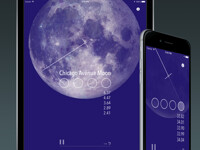
August 19, 2016. Chicago Avenue Moon is a responsive, generative music app that gathers a set of variables including date, time, phase of the moon, and GPS location, and uses that data to determine how its music unfolds, in real-time. The piece is intended for a listener in motion, whose route and speed affect the composition. Composer Joshua Dumas wrote 1000 brief musical phrases which the app manipulates,… Read more »
August 17, 2016. Yes. Make sure to update to Deliveries 7.1.3 for iOS or Deliveries 2.1.2 for Mac. After adding an Amazon delivery or entering your password you will be prompted to sign in. Make sure you select the checkboxes to “keep me signed in” and “don’t ask for codes on this device”. Read more »
June 27, 2016. When you have the menu bar icon enabled, just quit the app when you’re done using it, and the icon will remain in the menu bar. If you’d also like the app to continue updating your deliveries in the background, open the Deliveries menu and choose “Preferences…”, then click the General icon. Make sure “Update in the background” is checked. Read more »