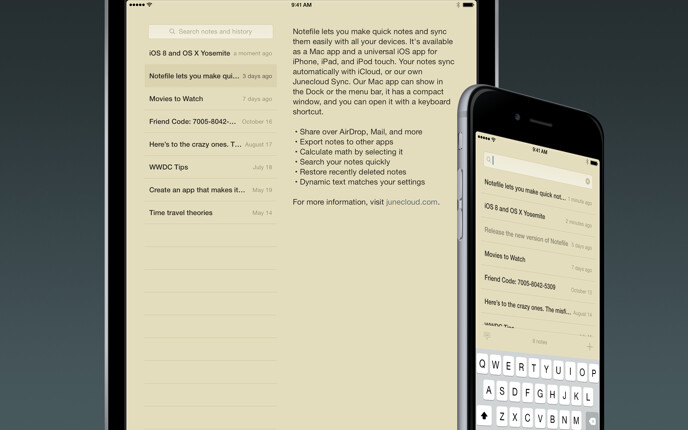

Notefile 2.7.4 for iOS
Requires iOS 8.0 or later. Compatible with iPhone, iPad, and iPod touch. Also available for Mac.
Need help?
If you have any questions, please see Notefile for iOS Help.
Notefile lets you make quick notes and view them easily, on all your devices. It’s available as a Mac app, a Dashboard widget, and a universal app for iPhone, iPad, and iPod touch. Your notes sync automatically with iCloud, or our own Junecloud sync.
- Share notes via AirDrop, email, iMessage, and more
- Open plain text files from other apps, and export them too
- Select math to calculate it right in your notes
- Supports TextExpander touch snippet expansion
- iOS 8 or later is required
Languages
Notefile is available in English, Japanese (by Nobtaka Nukui and Justin McPeak), French (Thierry Di Lenarda), and German (Jennifer Brehm).
Update history
New in version 2.7.4
- Fixed glitchy scrolling during a phone call or while getting directions.
- Fixed a related bug where the background of the app might turn black.
New in version 2.7.3
- Improved support for iOS 11 and iPhone X.
- The Help and About screens now load correctly.
- Fixed some problems with the “Add to Contacts” option.
- Improved iCloud compatibility with future versions of the app.
New in version 2.7.2
- Now compatible with iOS 11.
- Fixed a crash that could happen when selecting text.
- Some other minor adjustments.
New in version 2.7.1
- Added support for iPad Pro 10.5 and 12.9 screen sizes.
- Fixed a bug on iPad where the app would show a large blank area with a physical keyboard connected.
- Fixed a crash that could happen when opening the app.
- Fixed a crash that could happen when selecting a large amount of text.
- Updated to the latest version of TextExpander.
New in version 2.7
- All new iCloud syncing is faster and more reliable than ever. Make sure you update Notefile on all your devices to continue syncing—Notefile 2.7 for iOS or Mac. Older versions won’t be able to sync with these newer versions. Alternatively, you can use Junecloud Sync to sync with older versions.
- Improved reliability of Junecloud sync.
- Fixed a bug on iOS 9 where a note longer than the screen might get cut off.
- Fixed some possible crashes, and a few other minor improvements.
New in version 2.6
- Updated TextExpander, including support for JavaScript snippets.
- Syncing improvements for iCloud and Junecloud.
- Updated 1Password support.
- Some database optimizations.
- Lots of minor fixes and improvements.
New in version 2.5.1
- Fixed a bug where trying to sync Chinese or Japanese text to Junecloud might cause the app to crash.
- Fixed a bug where the TextExpander did not expand snippets unless TextExpander support was enabled in the settings, and snippets were manually synced. This is now optional, and only necessary if you want to use custom fill ins.
- Updated to TextExpander SDK 3.0.5, which fixes a problem where expanded snippets would have a stray letter at the end.
- Smoother animation when deleting a note.
- Improvements for Junecloud Sync, particularly when logging in or out.
- Fixed a bug where the form was blank after a Junecloud Sync sign in error.
- Fixed a bug where it was impossible to close the sync settings if there was a sign in error with Junecloud Sync.
- Autocorrect is now off for the email field on the sync settings screen.
- Fixed a bug where the app would crash when tapping on the version number.
New in version 2.5
- A fresh look, with full support for iOS 8, iPhone 6, and iPhone 6 Plus.
- Much smaller app size for faster loading.
- Easier access to share, export, and delete options while you’re viewing a note.
- Added a restore option to restore a deleted note without having to edit it.
- You can now search your history even after deleting the last note.
- Dynamic text to match your preferred text size settings.
- Improved iCloud support, especially with accounts that have iCloud Drive enabled.
- You can now look up your Junecloud password in either Safari or 1Password.
- Improved TextExpander support.
- Note: iOS 8 is now required.
New in version 2.1.1
- Fixed a bug that made it impossible to register for a Junecloud account from within the app.
- Fixed a possible crash while syncing, and some other minor syncing improvements.
New in version 2.1
- Significant performance improvements for iCloud sync.
New in version 2.0.3
- Smoother swiping animation on iPhone.
- You can now press ⌘= on a Bluetooth keyboard to calculate the selected math.
- Improved support for right-to-left languages.
- Fixed a lot of display quirks on iOS 7 and 7.1.
- Improvements for iCloud syncing.
- Improved error handling for web views.
- If TextExpander is still enabled, but the TextExpander app has been deleted, the “Update Snippets” button no longer appears.
- Fixed several possible crashes, including one when opening files.
- A few other minor improvements.
New in version 2.0.2
- Keyboard shortcuts for Bluetooth keyboards in iOS 7. ⌘N: add a new note. ⌘F: search. ⌘↩: Save and close the current note. ⎋: close the settings or cancel search.
- You can now type a space in the search field to show everything.
- Updated to the latest TextExpander SDK, with various bug fixes.
- Fixed a bug where you could not turn off TextExpander support if you had deleted the TextExpander app.
New in version 2.0.1
- Updated for the latest changes to TextExpander. Tap the gear icon and then TextExpander to update your snippets.
- If a note syncs while you’re editing it, the insertion point no longer jumps to the bottom.
- Improved compatibility with certain iOS versions.
- Fixed some minor display quirks on the sync settings screen.
- Icon refinements.
New in version 2.0
- A new look: redesigned for iOS 7 (but we didn’t forget about iOS 6).
- Background updates: with iCloud and iOS 7, your notes can now sync occasionally in the background.
- AirDrop: easily share notes with others around you.
- Updated to the latest TextExpander framework, with support for iOS 7.
- iCloud Keychain is now used for your Junecloud sync account if you have it enabled.
- Fixed a bug where Mail sharing did not work correctly.
- Fixed a bug where the “no results” text would sometimes appear behind a note.
- Improvements for iCloud and Junecloud syncing.
- 64-bit is now supported for the iPhone 5s, iPad Air, and the upcoming iPad mini with Retina Display.
- Note: iOS 6 or later is now required.
New in version 1.7
- Phone numbers and addresses are now tappable links. Tap and hold a link for more options.
- TextExpander 2.0 is now supported, including support for fill ins.
- Times are more specific, using text like “a moment ago” or “3 hours ago”.
- You can now print your notes. Tap a note in the list, tap Share, and then Print.
- On iPhone, Notefile does a better job of remembering the last note you had open.
- Fixed a bug on iPad that could result in changes to a note being lost.
- Fixed a bug where Twitter sharing would be blank if the note had more than 140 characters.
- Fixed a bug where some items were removed from the history too soon.
- Fixed a crash that could happen when selecting certain text.
- Improved reliability when syncing with Junecloud for the first time.
- Improved error checking when opening files.
- iOS 5.1 or later is now required.
New in version 1.6
- You can now long press on a link to Open, Copy, or Edit it.
- The buttons above the keyboard now ignore accidental taps while typing.
- Notefile’s URL scheme now supports searches: notefile://search or notefile://search?text=example
- 1Password integration lets you easily look up your Junecloud sync password.
- Viewing a note in your history no longer restores it. Make a change to a note to restore it.
- Fixed a bug on iPad where the app would crash if you were using the split keyboard, or had it undocked.
- Fixed a bug where the app would crash when exporting in iOS 4.
- Fixed several minor bugs and quirks related to adding, deleting, or selecting notes, mainly on iPad.
- Numerous tweaks and improvements for syncing.
- Many other minor bug fixes and refinements, especially in the settings.
New in version 1.5
- Tappable links: tap a link to open it in Safari.
- Text size: choose from various text sizes in the settings.
- Export: tap and hold a note in the list to export it and open it in another app.
- Faster launch time and much smaller app size.
- Imported files now preserve their date, and the file name is added to the first line.
- iCloud improvements for iOS 6 or later.
- Prettier search bar (requires iOS 5 or later).
- The search bar is no longer hidden on iPad.
- Improved the “calculate” option.
- Fixed a bug where the app would crash when tapping in the text area in iOS 4.
- Fixed a bug where a note might fail to save if you had just deleted the last note.
- Fixed a bug where the insertion point would move when rotating the device on iOS 6.
- Updated to TextExpander 1.2.3 SDK.
- Many other subtle improvements.
New in version 1.4
- Updated for iOS 6 and the 4" display on the iPhone 5 and the new iPod touch.
- Tap and hold a note in the list to share it (requires iOS 6).
- Tapping the note count while the search field is showing will now close the search.
- Fixed a possible syncing problem.
- Fixed a bug where the insertion point would sometimes jump around needlessly.
- Updated to TextExpander 1.2.2 SDK.
- Other minor bug fixes and improvements.
New in version 1.3
- iCloud sync: You can now sync your notes with either iCloud or Junecloud.
- History: Deleted notes are now kept in a history for 90 days, and included in searches.
- Open: Notefile can now open plain text (.txt) files for easy importing.
- Calculate: If a note includes some math you’d like to calculate, just select it and choose “Calculate”.
- Copy: You can now copy an entire note from the list view with a long press.
- Accessibility improvements.
- Updated to Text Expander 1.2 SDK.
- Improved icon.
- Other minor tweaks and bug fixes.
New in version 1.2
- Updated graphics for the new iPad with Retina Display.
- Added notefile:// URL scheme, for use in bookmarklets and apps like Launch Center.
- Improved help pages.
New in version 1.1.1
- Fixed a problem where quickly editing a note multiple times might result in the later changes not syncing.
- Fixed a problem where delete didn’t work with VoiceOver enabled.
- If syncing is slow, it will now try for a bit longer before it gives up.
- Improved scrolling on the help screens.
New in version 1.1
New features:
- Search! Just pull down on the notes list to reveal the search field.
- Swipe to the left to hide the notes list on iPad. Swipe to the right or tap the text at the bottom to reveal it.
Syncing:
- Many improvements to syncing reliability.
- We’ve updated our Terms of Use to make it clear that we will only use your content “for the sole purpose of providing the Service”.
- You can now download a copy of your notes from junecloud.com/sync
- The OS version is now included when syncing, to help us improve the service.
Bug fixes and improvements:
- Optimized for iOS 5.
- Improved VoiceOver support.
- Fixed a bug on iPhone where double-tapping on a note in a particular spot could open the settings.
- Fixed a bug on iPad where the add button would sometimes disappear.
- Various other minor bug fixes and subtle improvements.
1.0
- Initial release
Apple, the Apple logo, iPod, and iTunes are trademarks of Apple Inc., registered in the U.S. and other countries. iPhone is a trademark of Apple Inc.