The Future of Deliveries Deliveries began as a hobby—it was first released as a Dashboard widget named “Apple…
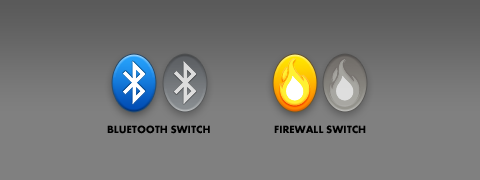
Switch widgets resurrected!
Quite a while back I decided to abandon my Bluetooth Switch and Firewall Switch widgets. I had already started on new versions of them, but they no longer worked in Leopard, few people seemed to be interested, and I didn’t have a lot of free time to spend on them. I can’t say I have any more free time these days, but I have learned a few things that made updating these pretty simple—so I decided to spend a day on it.
What do they do? Pretty simple really: just click once to turn Bluetooth or your firewall on or off. If it’s on, you’ll see a full color icon. If it’s off, you’ll see a greyed out, slightly transparent, pushed in icon. You can also set an app to automatically open—for example you could have Bluetooth File Exchange launch when you turn on Bluetooth.
Here’s what’s new:
- Now compatible with Leopard, as well as Tiger
- Bluetooth Switch no longer opens System Preferences!
- Improved graphics look nicer, make the off state more clear, and make the settings easier to use
- Now you can just double-click the widget if you want to open your selected app without toggling the switch (instead of holding O and clicking)
If you like these widgets, please let me know in the comments below! Your feedback will make a big difference in whether I continue to support these widgets in Snow Leopard and beyond. If you run into any problems please post those in the comments as well.
Download Bluetooth Switch 2.0 beta 2Download Firewall Switch 2.0 beta 2
Update: This beta is now closed! Download the final releases here. Firewall Switch has been tweaked a bit, and no longer opens System Preferences if you’re an admin user.
View more
Mac
An update on our apps It’s been a while since we shared an update on everything we’re working on. With iOS 15…
Upcoming changes to Deliveries Deliveries 9.2 will be available soon, and we wanted to let you know about some changes…
Deliveries 9 will arrive September 30 Deliveries 9 will be available this Wednesday, September 30, for iPhone, iPad, Apple…
Comments
This entry has 10 comments.
Jack Holt wrote on February 10, 2009:
Cool! I’ll definitely make use of the BT one. Know of anything similar for turning on/off wifi?
Daniel McCullum wrote on February 10, 2009:
Cool, I’ve been looking for something like this forever!
Alice wrote on February 10, 2009:
Thank you so much! I really appreciate your time and this useful widget.
sam wrote on February 13, 2009:
cool :-)
is there any way to enable/disable the firewall without opening the sys prefs ?
thanks for these !
Mike Piontek wrote on February 13, 2009:
Jack: I wouldn’t mind making one myself but I can’t seem to find a simple way to get the AirPort power status via Cocoa or command line. If anyone knows please fill me in!
Sam: It is possible (in Leopard at least) but the only way I’m aware of would require your admin password every time. Unless it stored your admin password, but that seems like a bad idea. If anyone figures out a better way to do it via Cocoa, command line, or AppleScript I’d be happy to integrate it.
Dominic wrote on February 18, 2009:
Thanks - I much prefer having a BT switch in my dashboard to having it in the menu bar. This is really quite convenient.
John wrote on February 27, 2009:
Great Thank You!
Eric J wrote on March 3, 2009:
I had been hoping to either find or developer a similar iPhone app that would flick WiFi on and off — and another that would increment through levels of brightness — without leaving the iPhone home screen. Based on my current understanding of the iPhone SDK that’s impossible. Pity, though.
Eric wrote on March 16, 2009:
Thanks a ton for updating these! I tried them a month or so ago and was disappointed to find they didn’t work in Leopard. They seem to work much more smoothly than the previous versions.
François-Xavier Bodin wrote on March 27, 2009:
One more thanks for updating your pretty usefull widget.
Regards from Bordeaux - France.