The Future of Deliveries Deliveries began as a hobby—it was first released as a Dashboard widget named “Apple…
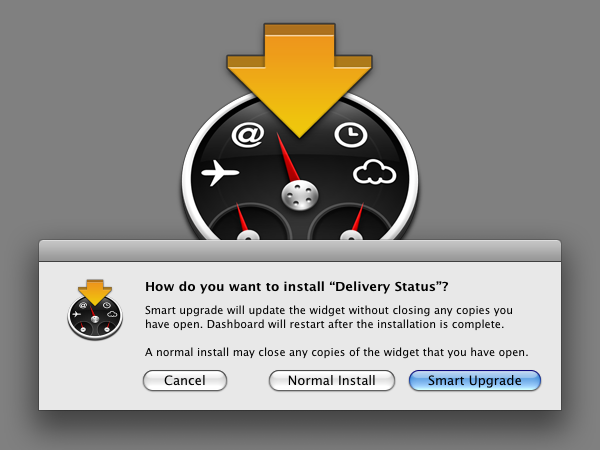
Smart Widget Installer beta
If you use Delivery Status, the screen above probably looks familiar. I’m taking the installer out of Delivery Status and splitting it off into its own app. Why? For one, I think forcing the installer on people has made some think twice about trying Delivery Status. It has also caused problems for a few people, who then had to go through a complicated process just to install the widget normally. The new History button on the back of the widget also makes the installer less necessary—even if you install an update normally and Dashboard closes all the widgets you had open, you won’t actually lose anything. (Though it still may be tedious to re-open all your widgets, and that’s why I’m still offering the installer separately!) I’m also working on another widget that will benefit greatly from this installer, so this will save me some trouble down the line.
Download Smart Widget Installer beta
Just drop any number of widgets on the app to install them. If the widget is not installed it will install normally. If it is already installed, you get the smart upgrade option, which will update the widget without closing any copies you already have open. This works with any widget. If you’re tired of having to move your widgets back in place every time you update them, this app is for you.
Even better, you can set Smart Widget Installer as the default application to open widgets:
- Select any widget in the Finder
- Choose “Get Info” from the File menu
- Go to the “Open with” section of the Get Info window and select Smart Widget Installer
- Click the “Change All…” button
Unfortunately Safari ignores this setting if you have it set to automatically open downloaded files. If you get the standard installation screen but want to do a smart update, you can just click cancel and then double-click the widget.
I especially need help testing in Tiger! Whether you have problems or it works perfectly, please let me know what version of OS X you tried it on. You can use it with any widget, but if you’d like to test it with Delivery Status you can download a version without the installer here. Thanks for your help!
View more
Mac
An update on our apps It’s been a while since we shared an update on everything we’re working on. With iOS 15…
Upcoming changes to Deliveries Deliveries 9.2 will be available soon, and we wanted to let you know about some changes…
Deliveries 9 will arrive September 30 Deliveries 9 will be available this Wednesday, September 30, for iPhone, iPad, Apple…
Comments
This entry has no comments.