September 13, 2009. I’ve been working on improving VoiceOver support for Delivery Status touch 3.0. It was pretty simple for the most part, but there are a couple of things in particular that I struggled with. I couldn’t find much information about this elsewhere, so I thought I’d share. The first problem was adding accessibility labels to a UISegmentedControl. It should be automatic if you’re using text labels… Read more »

June 16, 2009. Above: Apple’s live App Store wall at WWDC. It showed icons of 20,000 iPhone apps, organized by color. When an app was purchased, its icon rippled. It was also a great illustration of what WWDC is like: it’s a huge clusterfuck that makes you feel totally insignificant. But it’s also pretty beautiful and inspiring if you step back and take it all in. Last week I went to WWDC for the first… Read more »
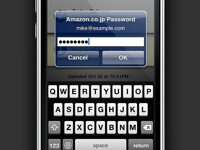
October 28, 2008. Writing your own iPhone or iPod touch app, and wondering how to create an alert like this? Check out the sample code below. I needed to display a password prompt in Delivery Status touch and quickly found that there was no ideal way to do it. There are some unsupported methods, but the workaround below—adding a UITextField as a subview of the alert—is the proper method for a third party… Read more »


April 26, 2007. Above: the Tense Log crop tool, a new feature in version 2.1 This is a pretty big update to Tense Log! Perhaps the most exciting change is the greatly improved setup process and increased compatibility. Installation (or upgrading) is now as simple as uploading the files and then opening the site in your browser. A series of pages walks you through the process and even fills in most of the… Read more »
« NEWER OLDER »