Plus 1.1
Plus has been discontinued. It is still available for those using OS X 10.5 through 10.7, but it is not compatible with Mountain Lion (10.8).
Donations
Much of our software is free of charge. However if you find it useful we do ask that you consider a donation. Your donation makes it possible for us to keep making great software. Click here to donate now!
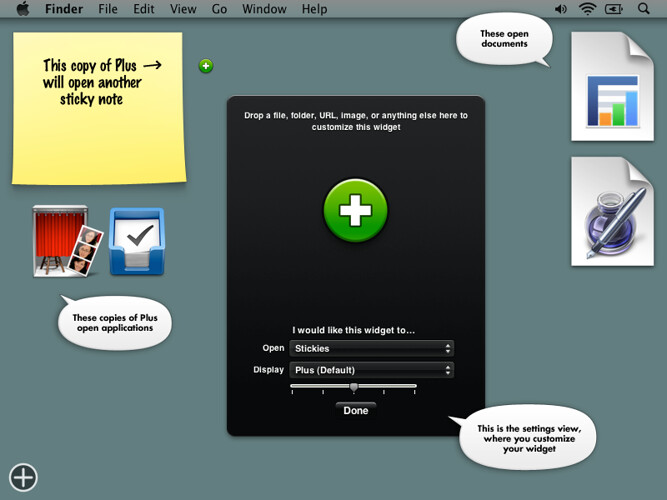
Plus is a customizable widget you can turn into anything.
With Plus, you can:
- Create a widget that launches any application, widget, file, folder, or web address just by dropping it onto Plus. It’s perfect for quick access to things you don’t want cluttering up your Dock, or widgets you open often (like Stickies).
- Decorate Dashboard by dropping in any image. You can drag images from your computer or straight from your web browser.
- Drop in multiple files so you can display one, and open another. For example you could drop in an image of a puppy and a link to your accounting spreadsheet, in an attempt to make your life more bearable.
How to use it
If you don’t already know how to drop a file into Dashboard: first you need to make sure you have a keyboard shortcut, mouse button, or screen corner set up to open Dashboard. To do this, open System Preferences in the Apple menu. Click the Exposé & Spaces icon, then click the Exposé tab. Once your shortcut of choice is set up, you can start dragging a file, activate the Dashboard shortcut without letting go of your mouse button, and then drop the file onto the widget.
Once you’ve dropped something onto Plus, a simple slider lets you adjust the image size. For larger images, check the “Max” box (where applicable). To edit your settings later, drop in a new file, or move the widget slightly and press + on your keyboard.
Requirements
Mac OS X 10.5 or later is required.
Update history
New in version 1.1
- Now compatible with Lion (Mac OS X 10.7)
- You’ll now get a friendly message if you try to run Plus on an unsupported system, instead of just not working correctly.
New in version 1.0
- Syncing via MobileMe is now supported! Previously only online images would sync properly, but now any image you drop into Plus will sync correctly. Keep in mind that if you set Plus to open a file, folder, or application, that item has to exist (in the same location) on each computer you sync, or clicking the widget will do nothing.
- Updated appearance.
- Updated version checking and links to junecloud.com.