The Future of Deliveries Deliveries began as a hobby—it was first released as a Dashboard widget named “Apple…
New Automator Actions beta 2
I’ve been working on some updates to my automator actions for a while now, and I figure this is a good time to finally kick them out the door. These new versions fix some bugs in Leopard and add a number of new features.
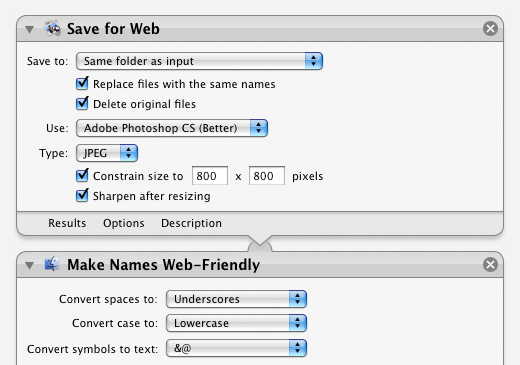
Save for Web 2.3:
- Added an option to save files in the same folder as the originals
- Added an option to delete the original files after saving
- Color profiles are now converted to sRGB before saving (with both Photoshop and Preview)—in particular Preview now handles CMYK files far better
- Fixed a bug in Leopard where the action would fail if Photoshop wasn’t already open
- Fixed a bug in Leopard where actions following Save for Web would not work correctly
Make Names Web-Friendly 2.3:
- Added an option to not change the case
- All characters that are not considered web-friendly or translatable are now removed (Asian language characters, for example)
- Now shows up in the Files/Folders section of Automator in Leopard
Create Clean Archive 1.1:
- Added an option to save files in the same folder as the originals
- Added an option to delete the original files after archiving
- Added an option to exlude all files and folders that start with a period (for example, .htaccess files)
- Now shows up in the Files/Folders section of Automator in Leopard
Create Symbolic Link 1.0.1 and Change Extensions 2.1.1:
- Now shows up in the Files/Folders section of Automator in Leopard
In addition to all the above, this version also includes a brand new installer that should work more reliably. (Apple has some new installer options in Leopard that allowed me to create it with far less effort and no scripting of my own.) I’ve also included an uninstaller script this time around.
Update: I’ve just put up another new beta. The actions above are relatively unchanged in this update, but I’ve added a couple of new ones and I’ve come up with yet another installation option. People were still having problems with the installer, so I’ve decided that a somewhat manual installation will just be easier for everyone. The nice thing is that in Leopard, you can just double-click an action to install it. So that’s all you have to do! You should be able to use them in Tiger as well if you drop them in your home/Library/Automator/ folder. The sample workflows are still included, so you can open them up and save them as Finder plug-ins, or whatever else you like. The uninstaller is also improved in this version. Here’s a bit of info on the new actions:
Hide Extensions 1.0
This action hides the file extension of the selected files.
Find Finder Items by Label 1.0
This action finds items in the Finder based on their label color. Just select the files or folders you want to search, pick a label, and it will return only the items that match that label.
Oh and by the way, I’ve decided to stop calling these “Automator Actions for the Web” or “Automator Actions for Web Designers”, since most of them can be used for quite a few different purposes. Feel free to call them “Automator Actions by Mike Piontek”, or just refer to them by their individual names.
Download Automator Actions beta 2. This is a beta so I recommend a little extra caution, particularly with the options that delete the original files. If you run into any problems please let me know in the comments below!
View more
Mac

An update on our apps It’s been a while since we shared an update on everything we’re working on. With iOS 15…
Upcoming changes to Deliveries Deliveries 9.2 will be available soon, and we wanted to let you know about some changes…

Deliveries 9 will arrive September 30 Deliveries 9 will be available this Wednesday, September 30, for iPhone, iPad, Apple…